
零基础——用 AI Agent 做单细胞拟时序分析(scRNA-seq-pseudotime) | 全程复制粘贴
本教程以 workbuddy 作为 AI agent、Hy3 作为 AI API 为例。AI agent 本身的安装与配置请看AI Agent 安装教程。
在开始之前(必读):
- 如果你是第一次用 AI agent 做生信分析,强烈建议先跟一遍 bulk-RNA-seq 差异分析教程,熟悉"装技能 → 配环境 → 跑示例 → 换自己数据"的完整流程,再回来做本技能。
- ⚠️ 硬件要求(单细胞技能通用):请使用内存 ≥16 GB、多核 CPU 的电脑。 本技能的内存高峰在 learn_graph 和 graph_test 两步。
- 本技能是 scRNA-seq 常规流程的下游技能:它吃的是常规流程产出的
annotated_seurat.rds(本技能不做 QC / 聚类)。请先跑完 scRNA-seq 常规流程再来。 - 一句话:复用已有的 UMAP 嵌入与 cluster ID,用 monocle3 学轨迹图,从你指定的起点排出拟时序,并用 graph_test 找拟时序相关基因。
- 起点选择是生物学决策:技能拒绝在你没指定 root 的情况下运行——它会先打印 cluster → 细胞类型对照表帮你选,选哪个由你决定。
教程结构:
- Step 1|安装 scRNA-seq-pseudotime 技能(只需一次)
- Step 2|配置运行环境(只需一次)
- Step 3|跑通示例数据
- Step 4|换成你自己的数据
- Step 5|读懂 REPORT.md
- 更多分析|相关技能简介(常规流程 / 虚拟敲除)
Step 1|Install the scRNA-seq-pseudotime skill
输入以下 prompt:
Please install the "scRNA-seq-pseudotime" skill for me, into the D:\claw2bio folder:
1. Create a folder named claw2bio in the root of the D: drive (if it doesn't exist yet).
2. From the GitHub repository https://github.com/nihuanhe/claw2bio, fetch ONLY the folder
   bioinformatics/sc_RNA_seq/scRNA-seq-pseudotime (use sparse checkout — do NOT clone the
   whole repository), and place it at D:\claw2bio\scRNA-seq-pseudotime.
3. If downloading from GitHub fails or is too slow, download the zip from this mirror link instead:
   https://claw2bio.site/downloads/scRNA-seq-pseudotime.zip
   and extract it to D:\claw2bio\scRNA-seq-pseudotime.
4. Read the SKILL.md inside, then confirm to me that the skill is ready and list the contents
   of the folder.
(If my PC has no D: drive, install to C:\claw2bio instead and tell me the actual path.)
Step 1 完成后,打开文件管理器确认 D:\claw2bio\scRNA-seq-pseudotime 文件夹存在,里面有 scripts/、examples/、SKILL.md 等内容。
Step 2|Set up the runtime environment
如果你已经按 scRNA-seq 教程装好了 R(≥4.5)+ Seurat 环境,这一步主要是补装 monocle3。输入 prompt:
Please set up the runtime environment for the "scRNA-seq-pseudotime" skill at
D:\claw2bio\scRNA-seq-pseudotime:
1. R should already be installed from the scRNA-seq tutorial — verify that R (4.5 or above)
   and the Seurat environment are installed; report versions to me. If anything is missing,
   stop and tell me.
2. Install the additional R packages this skill needs (monocle3 and its dependencies): try
   CRAN / Bioconductor online first; if any package fails or is too slow, stop and tell me
   about it. Also make sure Python has pandas / numpy / scipy available.
3. When everything is installed, confirm to me that the skill can run, and remind me of my
   RAM size and CPU core count (single-cell work needs ≥16 GB RAM and a multi-core CPU).
Step 3|跑通示例数据
先不带 root 跑一次:技能会打印 cluster → 细胞类型对照表然后退出,帮你选起点。输入 prompt:
The skill is installed at D:\claw2bio\scRNA-seq-pseudotime. Please run the bundled example:
1. Find the example annotated_seurat.rds in the skill's examples/ folder.
2. FIRST run the pipeline WITHOUT any root option — the skill will print a cluster → cell-type
   label table and exit by design. Show me that table.
3. Then ask ME which cluster or cell type to use as the trajectory root — do NOT pick one
   yourself; the root is a biological decision.
4. After I tell you the root, run the full pipeline: python scripts/run_pseudotime.py
   <annotated_seurat.rds> <output_dir> --root-cluster <the cluster I chose>
   (or --root-label "<the label I chose>").
5. Prefer the skill's own scripts in scripts/ — do NOT write new analysis code from scratch.
6. When the run succeeds, show me the trajectory colored by pseudotime, the trajectory colored
   by cluster, and the top-4 pseudotime-gene trend plots; then explain the REPORT.md line
   by line.
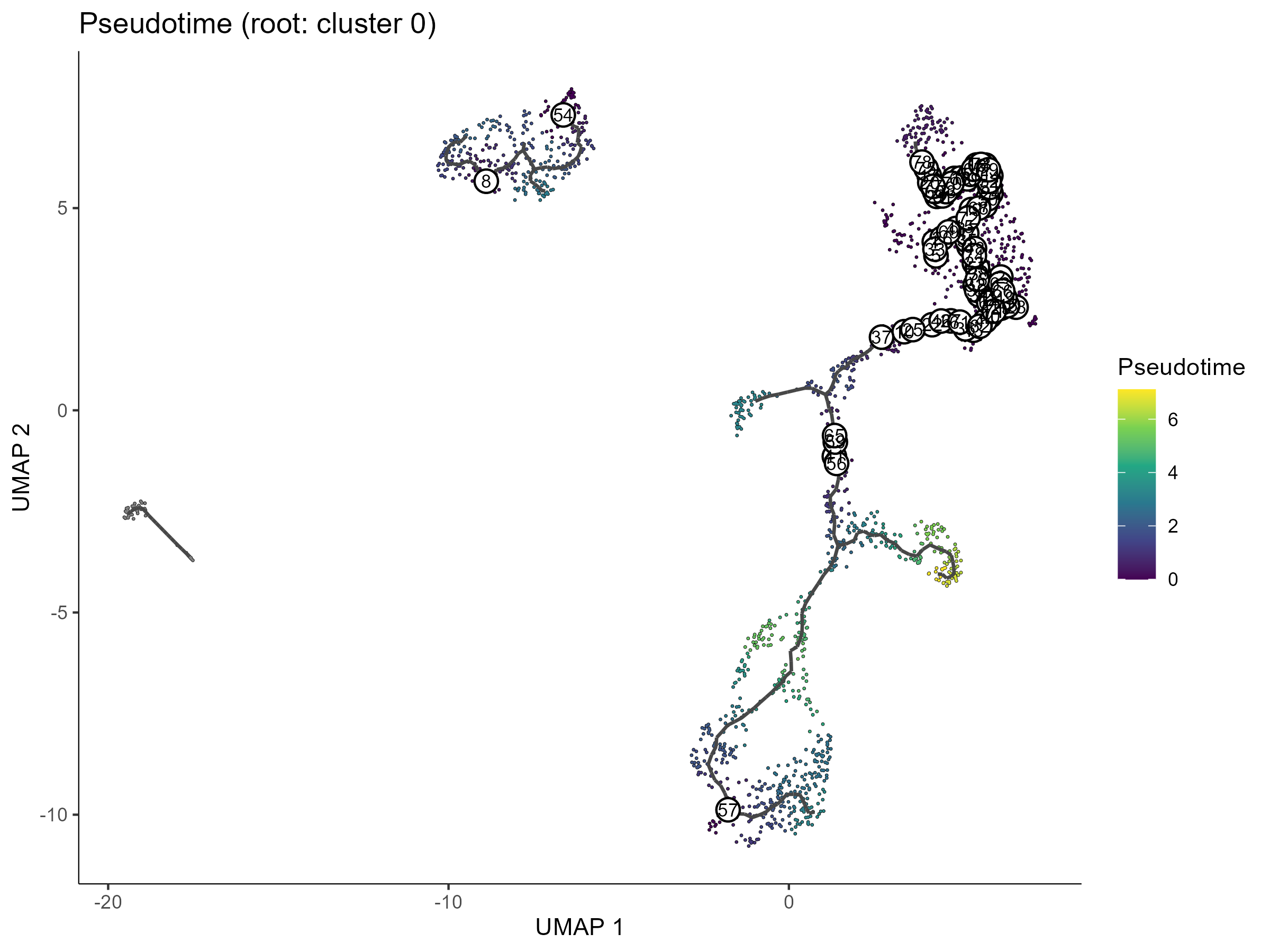
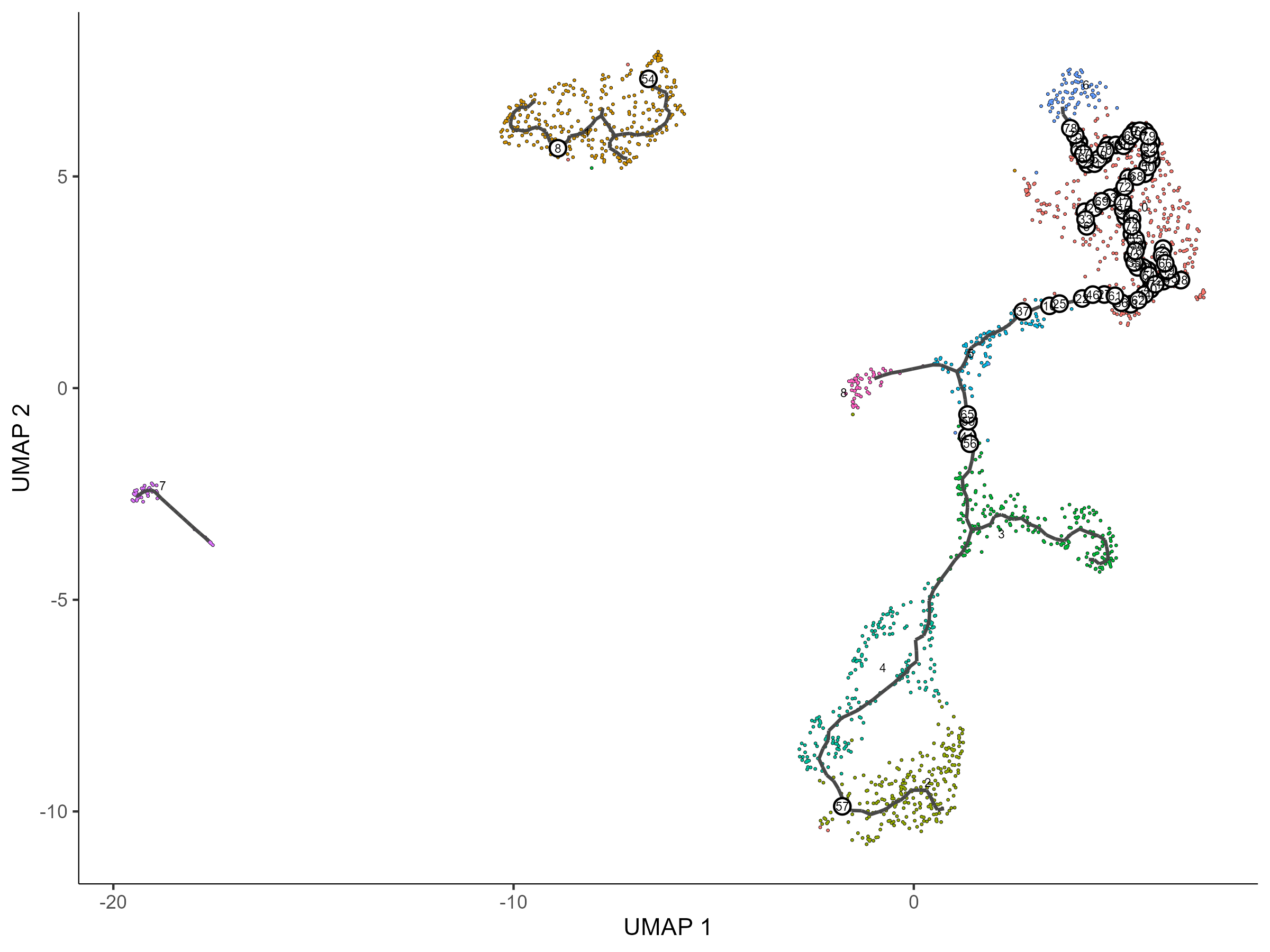
运行成功后,你应该看到三类图(示例效果如下,你的网站实跑结果会替换成自己的截图)。真实示例锚点:GSE234527 全量 10,859 个细胞、以 cluster 0 为 root,全程约 11 分钟,找出 13,790 个拟时序相关基因(q < 0.05):
按拟时序着色的轨迹图——颜色越暖表示离起点越远:
同一轨迹按 cluster 着色,确认轨迹走向与细胞类型的对应关系:
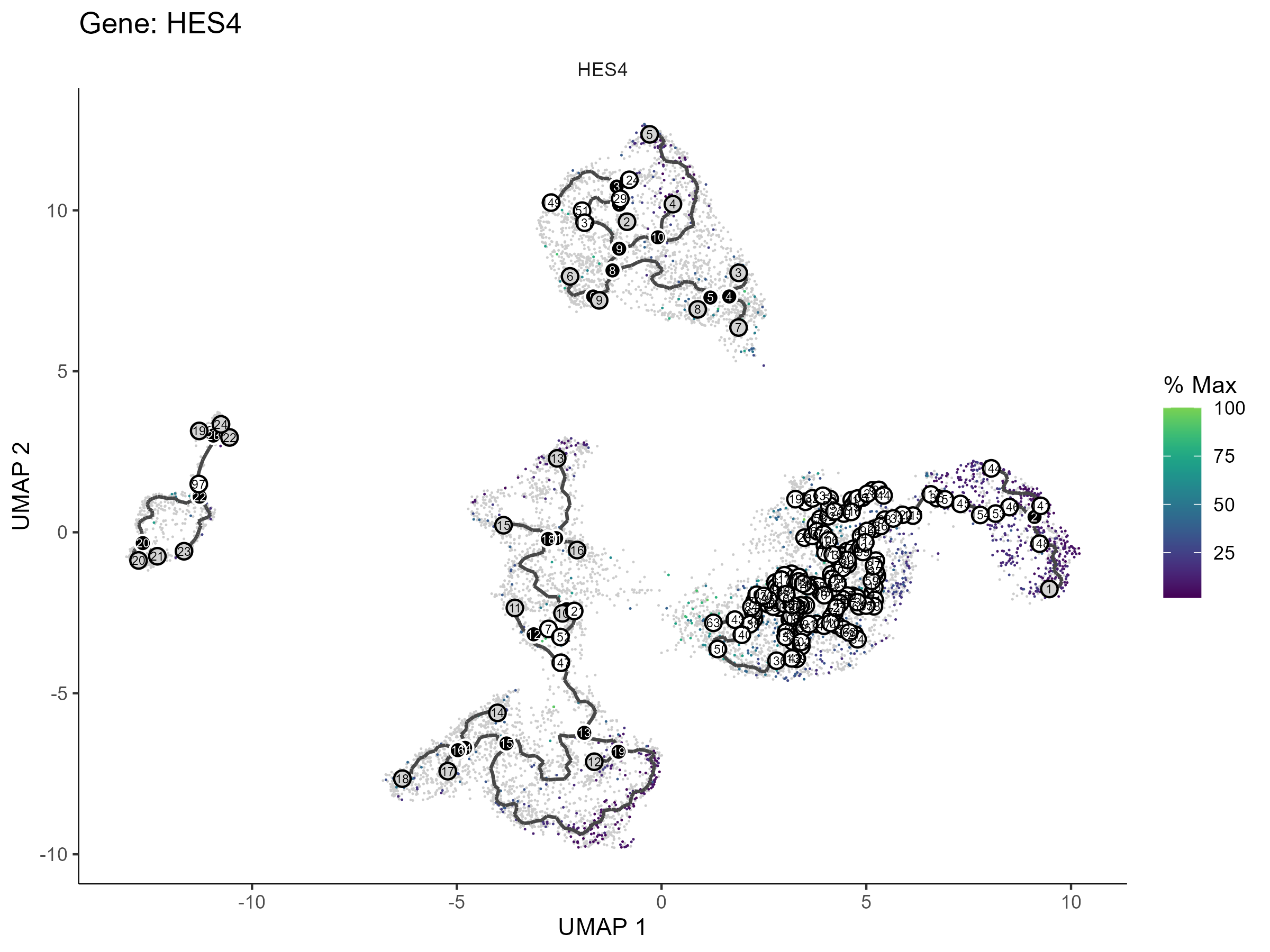
graph_test 排名靠前的基因在轨迹上的表达趋势(top-4 各出一张):
Step 4|换成你自己的数据
把你自己跑完常规流程得到的 annotated_seurat.rds 交给它。输入 prompt:
My own annotated Seurat object is at: <paste the path to your annotated_seurat.rds here —
it must come from the scRNA-seq standard pipeline and contain seurat_clusters, the UMAP
reduction, and cell_type_final>.
1. FIRST run the skill WITHOUT any root option to print the cluster → cell-type label table
   (you can also consult annotation_per_cluster.csv from the main pipeline). Show me the
   table and ask ME to choose the root — do NOT pick one yourself.
2. <Optional: I only want the trajectory within these cell types: <labels> — use
   --subset-labels.>
3. After I tell you the root, run the full pipeline with the skill's own scripts — do NOT
   write new analysis code from scratch.
4. Memory management: learn_graph and graph_test are the memory peaks. The skill writes
   .checkpoint_cds_learned.rds after learn_graph — if the run crashes, re-run WITH --resume
   to reuse the checkpoint instead of starting over. If graph_test is too slow or too heavy,
   ask me whether to add --no-graph-test (trajectory only) or narrow the cell range with
   --subset-labels.
5. When the run succeeds, show me the trajectory figures and the top-gene trend plots, and
   explain the REPORT.md line by line.
等候 AI agent 运行结束:pseudotime_cds.rds(带拟时序的 monocle3 对象)+ 一套轨迹图 + pseudotime_genes.csv(graph_test 全表,q < 0.05 为显著)+ top-4 基因趋势图。
Step 5|读懂 REPORT.md
输入 prompt:
Please explain the REPORT.md in my pseudotime results folder line by line:
1. What each output file is and what it contains (pseudotime_cds.rds, the trajectory figures,
   pseudotime_genes.csv, the top-gene trend plots);
2. Walk me through MY trajectory: does the pseudotime direction match the known biology of my
   cell types (e.g., from progenitor-like to differentiated)? If it looks reversed, explain
   that the root choice determines the direction;
3. Among the significant pseudotime-associated genes (q < 0.05), point out the top 10 most
   interesting ones and what they may suggest biologically;
4. Any warnings or things I should pay attention to.
After explaining, tell me which figures and tables can be used directly in a paper or
presentation.
阅读完 AI 的解释,如果有不懂的直接问它。
更多分析
下面两个技能与本技能配套,安装方式完全相同(一键 prompt 或网站下载 zip 包)。同样需要 ≥16 GB 内存 + 多核 CPU:
单细胞 RNA-seq 常规流程 —— scRNA-seq
一句话:从各种格式的原始矩阵进,到注释好的 Seurat 对象出。 如果你还没有 annotated_seurat.rds,先做这个。
详细介绍与下载:/zh/skills/scRNA-seq
单细胞虚拟敲除 —— scRNA-seq-virtual-ko
一句话:指定一个基因,用 scTenifoldKnk 在计算机里"敲除"它,看调控网络怎么变。 拟时序找到的关键基因,可以顺手用虚拟敲除预测它的调控作用(计算预测,需实验验证)。
详细介绍与下载:/zh/skills/scRNA-seq-virtual-ko