
scRNA-seq 单细胞常规流程
一句话:从各种格式的原始矩阵进,到注释好的 Seurat 对象出——QC、Harmony 整合、聚类、UMAP、marker、SingleR 注释一条龙,每个阶段自动存 checkpoint 支持断点续跑。
获取本技能 · Get this skill
方式 A —— 一键引导 prompt(推荐)。复制下面这段,粘贴到你的 AI agent IDE:
请帮我安装 Claw2Bio 技能库中的 "scRNA-seq" 技能:
1. 从 GitHub 仓库 https://github.com/claw2bio/claw2bio 只拉取 bioinformatics/sc_RNA_seq/scRNA-seq
   这一个文件夹(用 sparse checkout,不要克隆整库)。
2. 阅读其中的 SKILL.md 并注册该技能。
3. 运行 examples/ 里的示例验证环境,把输出的图给我看。
方式 B —— 独立 zip 包(约 28 MB,本站下载):https://claw2bio.site/downloads/scRNA-seq.zip
方式 C —— 全量示例数据(约 105 MB,腾讯 COS 直链):https://my-website-1358159656.cos.ap-guangzhou.myqcloud.com/scRNA-seq/data/scRNA-seq-examples.zip
它能做什么
输入一个目录(10X mtx / h5 / h5ad / rds / 文本矩阵 / 华大 BGI / 多样本混杂均可,stage 00.5 自动体检并修复 9 类格式坑),输出注释好的 annotated_seurat.rds 与全套 QC、聚类、marker、注释图表。内置示例是降采样的 GSE234527(5 个样本 × 400 细胞):QC 后保留 1820 个细胞(各样本保留率 93.8%–98.2%),聚成 9 个 cluster;多样本默认 Harmony 整合并输出整合前后对照 UMAP。
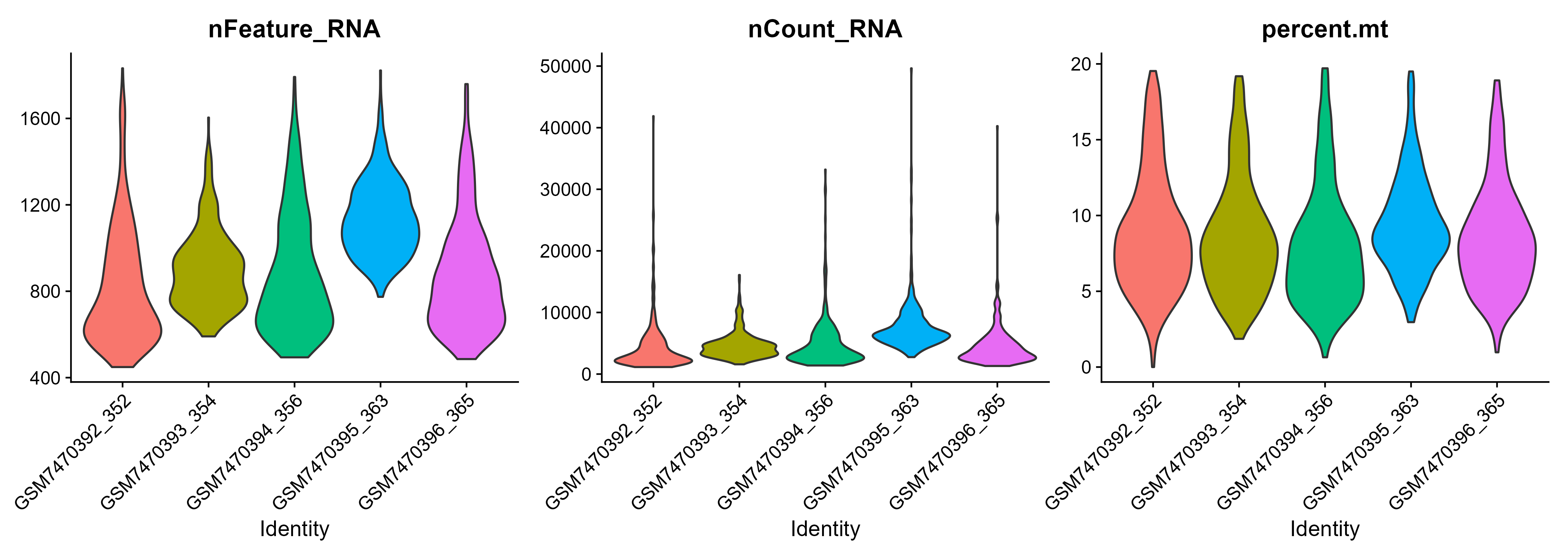
QC 后每个样本的 nFeature / nCount / percent.mt 分布(示例 1820 细胞,QC 阈值 percent.mt ≤ 20%)。
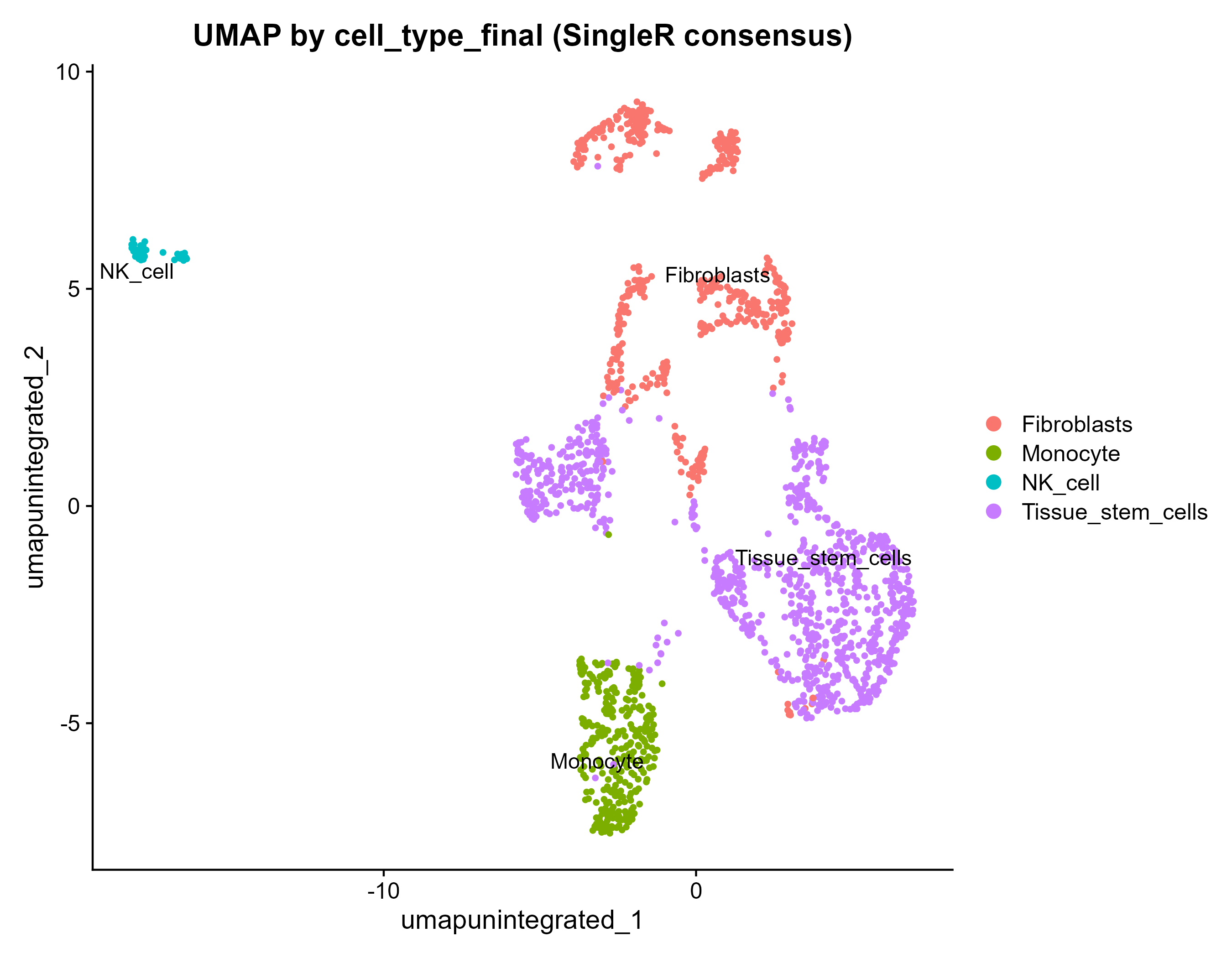
按 cell_type_final 着色的 UMAP——SingleR 自动注释结果(支持手动注释 CSV 一键回写,优先级高于 SingleR)。
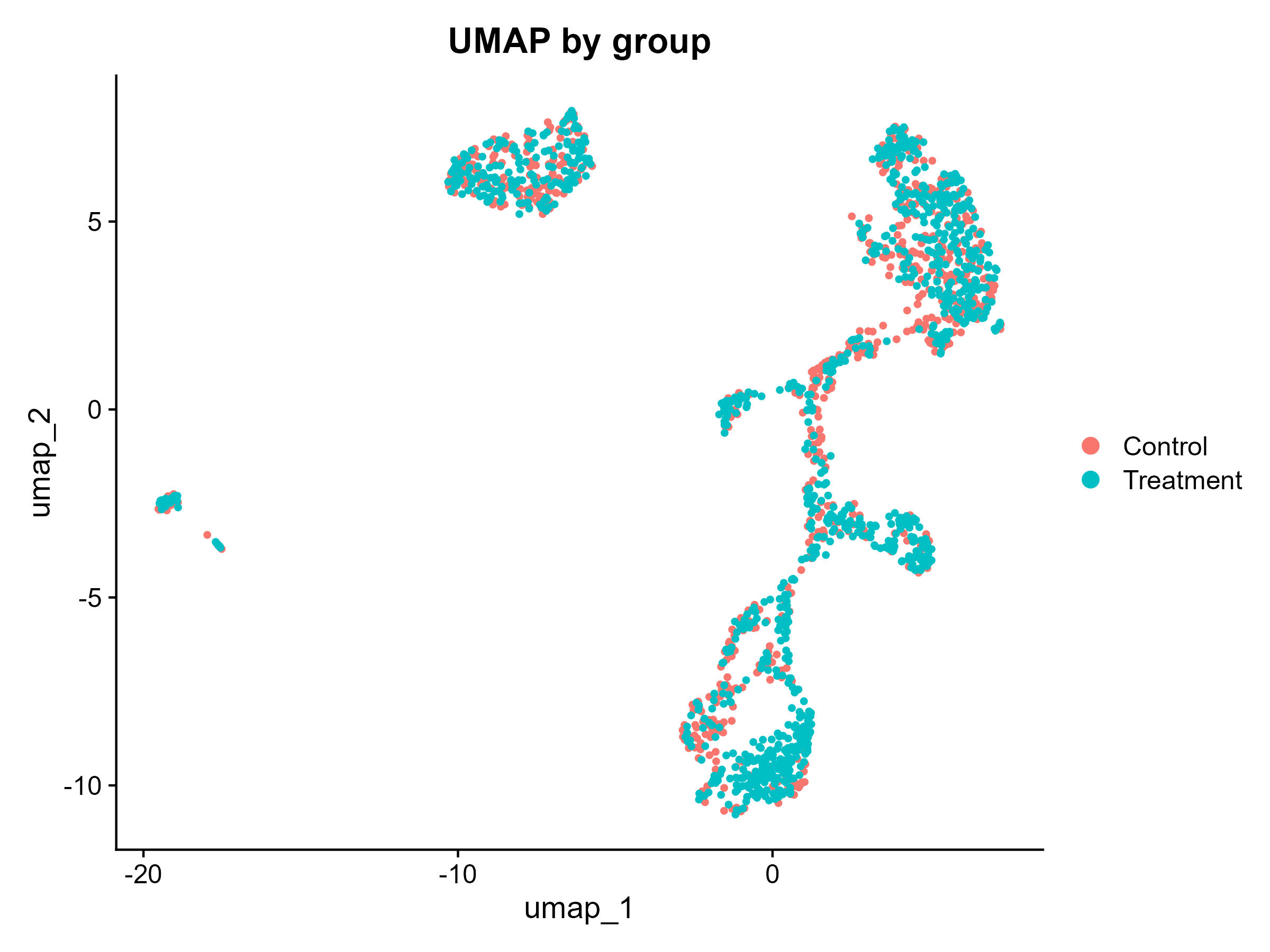
按样本分组着色的 UMAP,用于检查组间分布与批次混杂。
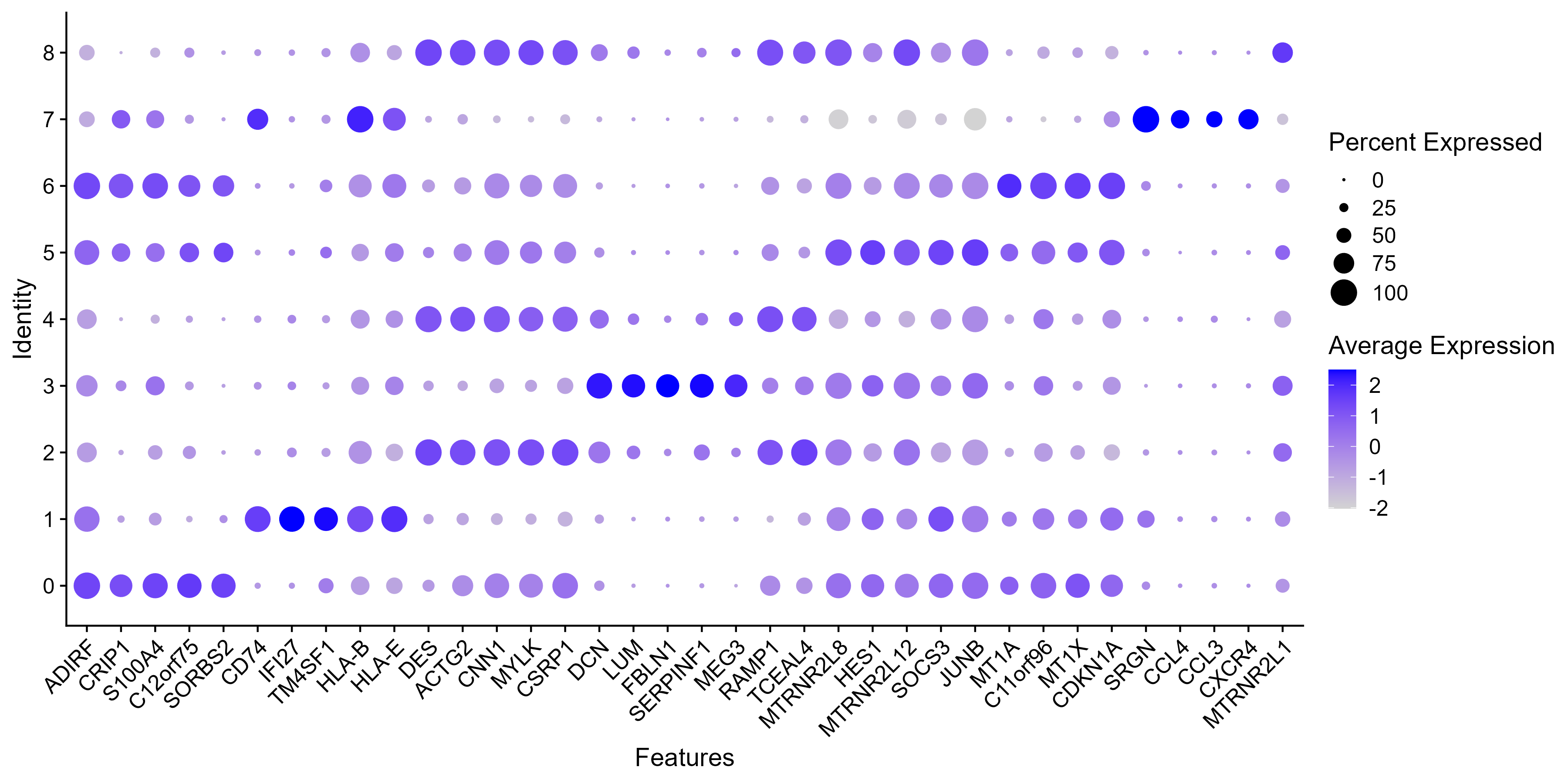
每个 cluster 的 top-5 marker 点图(presto 加速的 wilcoxauc 检验)。
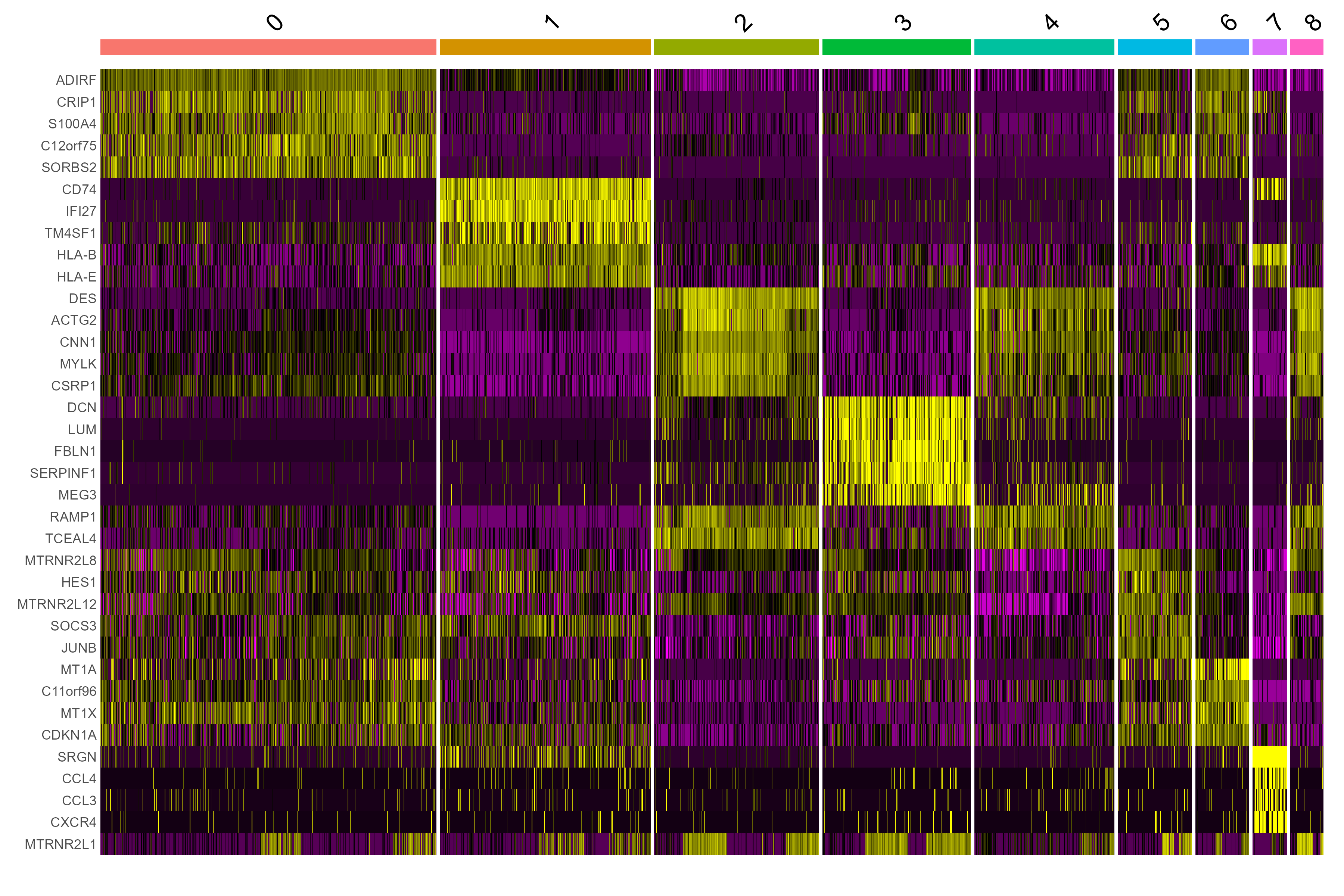
top-5 marker 表达热图,用于人工核对 cluster 身份。
本流程只到自动注释为止——拟时序、虚拟敲除是独立技能,都吃本流程的 annotated_seurat.rds。
快速上手(30 秒)
技能装好后,直接对 agent 说:
运行 scRNA-seq 的示例,把 UMAP 给我看。
或手动执行:
cd bioinformatics/sc_RNA_seq/scRNA-seq
pip install pandas numpy scipy
python scripts/run_scrnaseq.py \
  examples/1_example_GSE234527_downsampled-10x-mtx/input \
  examples/1_example_GSE234527_downsampled-10x-mtx/output \
  --metadata examples/1_example_GSE234527_downsampled-10x-mtx/input/sample_metadata.csv \
  --overwrite
需要 R(≥4.5)及 Seurat / harmony / SingleR 等包;stage 00 会先检查依赖,缺包可加 --install-deps 让 agent 代装。
输入格式
- 单个 10X 目录、一目录的多样本文件,或上述 9 类格式的任意混合;输入永不被修改(解包/导出都进
<output>/.staging/)。 - 可选
sample_metadata.csv:两列sample,group(样本名模糊匹配,容忍 GSM 前缀与.tar后缀);不提供则进入单样本探索模式。
输出文件
| 文件 | 内容 |
|---|---|
annotated_seurat.rds | 核心交付物:QC 后、聚类、注释的 Seurat v5 对象 |
markers_all.csv / top10_markers.csv | 每个 cluster 的 marker 表(presto wilcoxauc) |
annotation_per_cluster.csv | 各参考注释对照 + refs_agree 一致性标记 |
QC_violin_before/after.png | QC 前后小提琴图 |
UMAP_by_* / TSNE_by_* | 按 cluster / 样本 / 分组着色的降维图 |
UMAP_before/after_integration.* | Harmony 整合前后对照(多样本时) |
marker_heatmap.* / marker_dotplot.* | top-5 marker 热图与点图 |
REPORT.md / run_metadata.json | 人类可读报告 + 机器可读运行记录 |
.checkpoints/ | 每阶段 rds,供 --resume 断点续跑 |
参数
| 参数 | 默认值 | 说明 |
|---|---|---|
--metadata | — | sample,group CSV(缺省 → 探索模式) |
--organism | human | human / mouse |
--integrate | harmony | harmony / cca / rpca / none(仅多样本) |
--mt-max | 20 | percent.mt 阈值(%) |
--min-features / --max-features-qc | 200 / 6000 | nFeature 上下界 |
--no-doublets | 关 | 跳过 scDblFinder 双细胞检测 |
--resolution | 0.5 | 聚类分辨率(参考 clustree_resolution_scan.png) |
--downsample N | 0 | 每样本抽样 N 个细胞(大样本探索用) |
--resume | 关 | 跳过已完成阶段 |
--overwrite | 关 | 允许非空输出目录 |
常见问题
- 跑到一半爆内存 → 这是常态(合并/整合是内存高峰):直接加
--resume重跑,已完成阶段不会重复;大样本先--downsample。 - UMAP 上批次分层明显 → 确认走了 Harmony(多样本默认开),查看
UMAP_before/after_integration对照图。 - percent.mt 全为 0 → 线粒体前缀会被自动嗅探;识别失败时用
--mt-pattern "^MT-"手动指定。 - 想手动注释 → 把
top10_markers.csv改成两列cluster,cell_typeCSV,跑Rscript scripts/apply_manual_annotation.R <rds> <csv> <outdir>(REPORT.md 里有同样指引)。 - h5ad 输入报错 → 需要
pip install anndata。
相关链接
- GitHub 源码与 SKILL.md
- 相关技能:拟时序分析 · 虚拟敲除