
零基础——用 AI Agent 做 RNA-seq 富集分析(GO / KEGG / Reactome) | 全程复制粘贴
本教程以 workbuddy 作为 AI agent、Hy3 作为 AI API 为例。AI agent 本身的安装与配置请看AI Agent 安装教程。
在开始之前(必读):
- 如果你是第一次用 AI agent 做生信分析,强烈建议先跟一遍 bulk-RNA-seq 差异分析教程,熟悉"装技能 → 配环境 → 跑示例 → 换自己数据"的完整流程,再回来做本技能。
- 本技能是 bulk-RNA-seq 的下游技能:它吃的是 bulk-RNA-seq 流程产出的
DEG_*.csv差异分析结果表。请先跑完 bulk-RNA-seq 教程并保留好它的 output 文件夹,再来做富集分析。 - 一句话:DEG 表进,GO / KEGG / Reactome 富集表和点图出——GO 与 Reactome 全程离线,KEGG 联网失败自动使用本地 GSON 快照,再回退旧 CSV 缓存,断网也能出图。
教程结构:
- Step 1|安装 RNA-seq-enrichment 技能(只需一次)
- Step 2|配置运行环境(只需一次)
- Step 3|跑通示例数据
- Step 4|换成你自己的数据
- Step 5|读懂 REPORT.md
- 更多分析|下游技能简介(指定基因柱状图 / GSEA)
Step 1|Install the RNA-seq-enrichment skill
输入以下 prompt:
Please install the "RNA-seq-enrichment" skill for me, into the D:\claw2bio folder:
1. Create a folder named claw2bio in the root of the D: drive (if it doesn't exist yet).
2. Download the current skill package:
   https://claw2bio.site/downloads/RNA-seq-enrichment.zip
   and extract it to D:\claw2bio\RNA-seq-enrichment.
3. If downloading from the website fails, fetch ONLY the folder
   bioinformatics/bulk_RNA_seq/RNA-seq-enrichment from
   https://github.com/nihuanhe/claw2bio (use sparse checkout — do NOT clone the whole
   repository), and place it at D:\claw2bio\RNA-seq-enrichment.
4. Read the SKILL.md inside, then confirm to me that the skill is ready and list the contents
   of the folder.
(If my PC has no D: drive, install to C:\claw2bio instead and tell me the actual path.)
Step 1 完成后,打开文件管理器确认 D:\claw2bio\RNA-seq-enrichment 文件夹存在,里面有 scripts/、examples/、SKILL.md 等内容。
Step 2|Set up the runtime environment
如果你已经按 bulk-RNA-seq 教程装好了 R(4.5 或以上),这一步主要是补装富集分析专用的 R 包。输入 prompt:
Please set up the runtime environment for the "RNA-seq-enrichment" skill at
D:\claw2bio\RNA-seq-enrichment:
1. R should already be installed from the bulk-RNA-seq tutorial — verify that R is installed
   and report its version to me (it must be 4.5 or above). If R is missing, stop and tell me.
2. Install all R packages this skill needs (clusterProfiler and its dependencies): try CRAN /
   Bioconductor online first; if any package fails or is too slow (especially large annotation
   packages such as org.Hs.eg.db and org.Mm.eg.db), stop and tell me — the bulk-RNA-seq skill's
   resources/ folder has precompiled packages and a mirror download address that both skills share.
3. Once the packages are in, run scripts/build_pathway_cache.R --organism both ONCE to build the
   local pathway cache. This creates dated KEGG GSON snapshots plus legacy CSV fallbacks;
   Reactome and GO are always offline.
4. Finally, run the dependency-check script scripts/00_check_deps.R --organism mouse inside the
   skill folder and show me the result.
Step 2 结束后,AI agent 会告诉你依赖检查是否全部通过。
本地 KEGG 快照——由每位用户自行生成
网站和 skill ZIP 只提供代码,不提供 KEGG 注释文件。每位用户在自己的电脑上运行缓存构建脚本, 从 KEGG 官方 API 下载并生成注释快照;不需要从缓存制作者的电脑下载,因此对方的电脑不必保持开机。 KEGG API 仅供学术用户使用;非学术用途需要取得相应许可。
KEGG 数据源顺序如下:
- 默认: KEGG 在线 → 最新有效的本地 GSON → 旧 CSV。
- 离线: 添加
--offline,跳过在线请求,使用本地 GSON → 旧 CSV。 - 固定快照: 添加
--kegg-gson "D:/path/kegg_mmu_gson_YYYYMMDD.rds",强制使用指定文件并跳过在线请求。 人用hsa文件,小鼠用mmu文件。
示例:
Rscript scripts/enrich.R examples/input examples/output --organism mouse --offline
Rscript scripts/enrich.R examples/input examples/output --organism mouse \
  --kegg-gson "D:/path/kegg_mmu_gson_20261116.rds"
请在分析记录中保留快照日期:不同日期的 KEGG 注释可能产生不同富集结果。缓存更新失败时,不会替换 之前的有效快照。
Step 3|跑通示例数据
输入 prompt:
The skill is installed at D:\claw2bio\RNA-seq-enrichment. Please run the full enrichment
pipeline on the bundled example data:
1. Example input is at D:\claw2bio\RNA-seq-enrichment\examples\input\
2. Write results to D:\claw2bio\RNA-seq-enrichment\examples\output\
3. Prefer the skill's own scripts in scripts/ — do NOT write new analysis code from scratch.
4. When the run succeeds, show me the key result figures in this order: first the GO Biological
   Process dotplot, then the KEGG dotplot, and finally the Reactome dotplot; then explain the
   generated REPORT.md line by line.
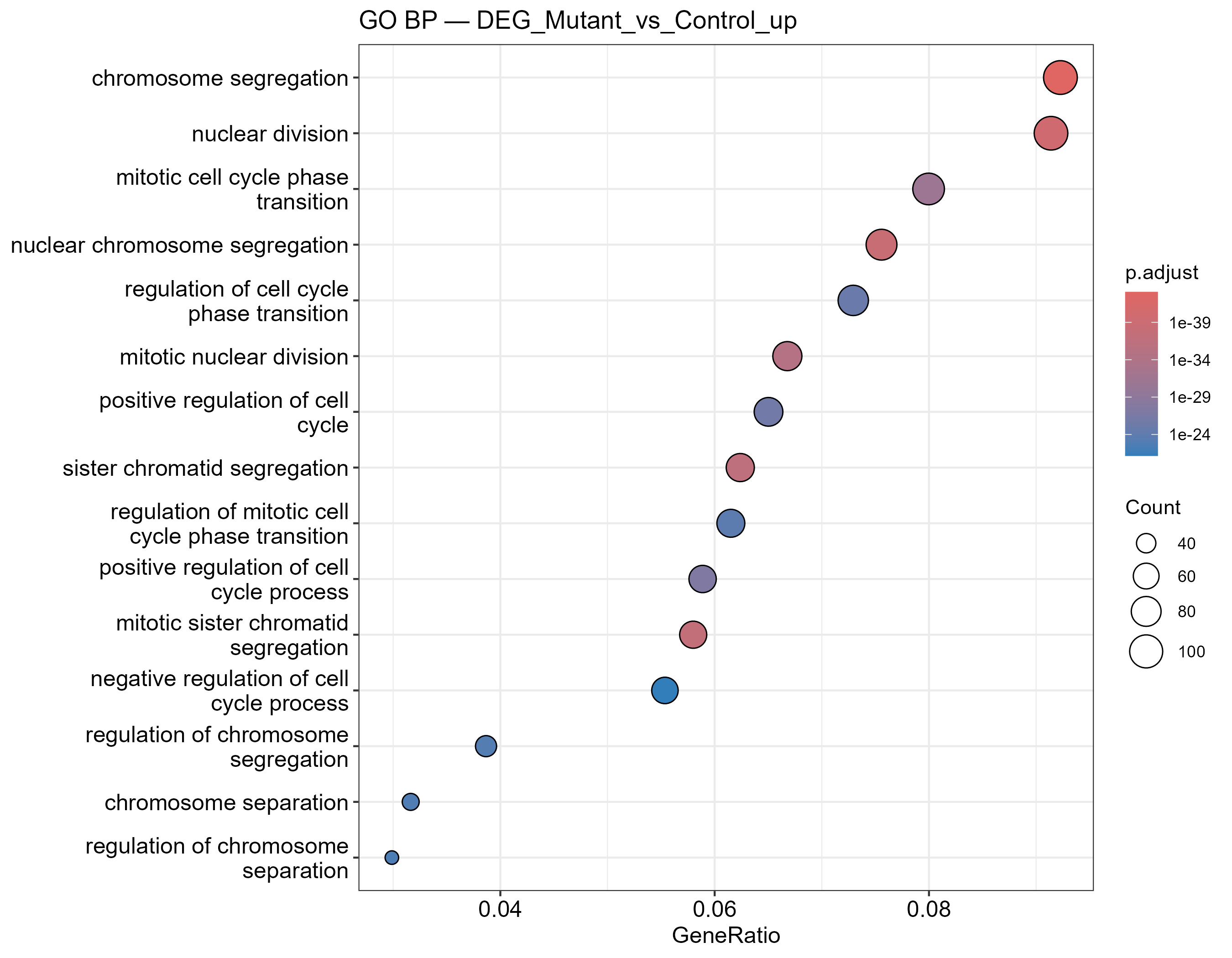
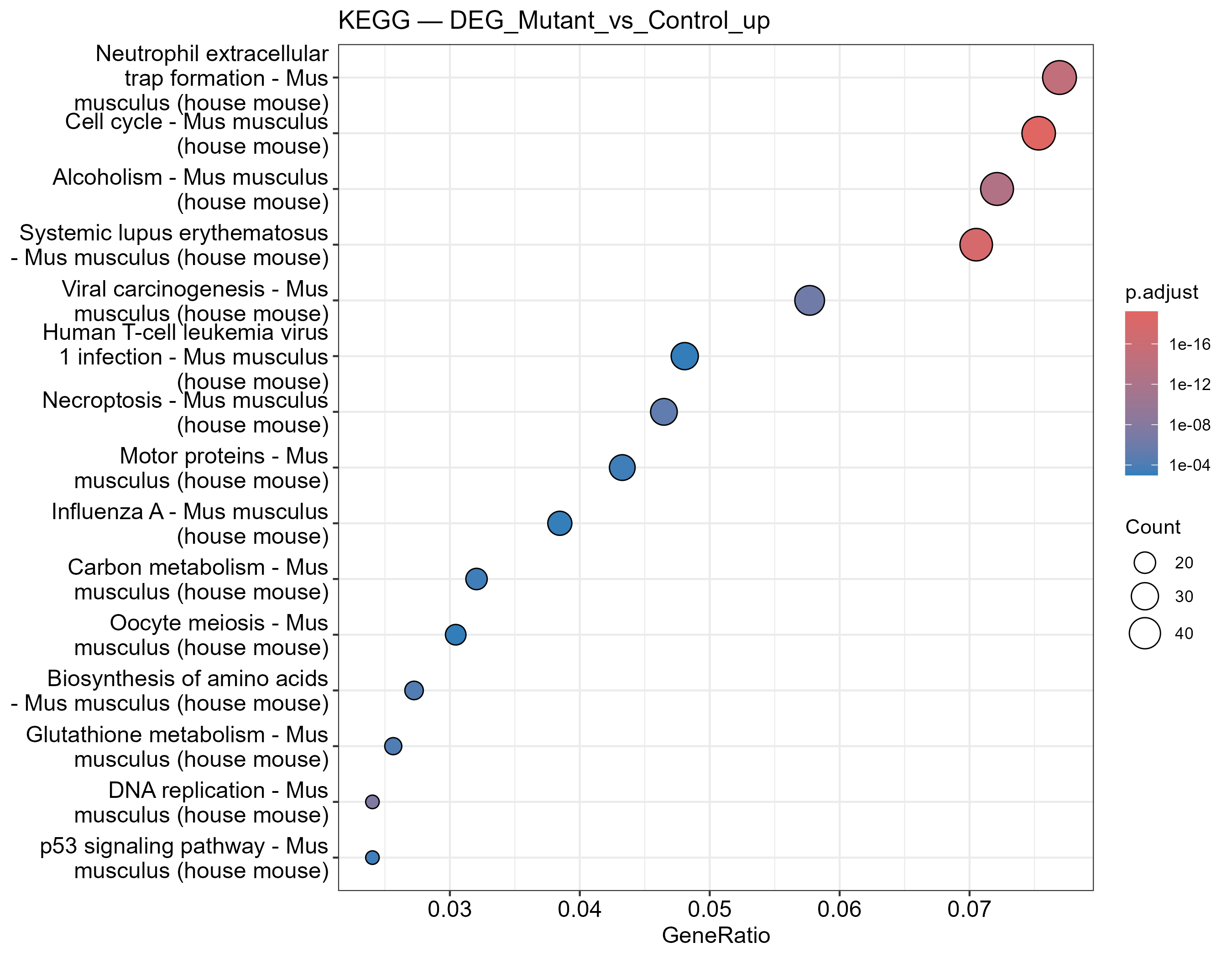
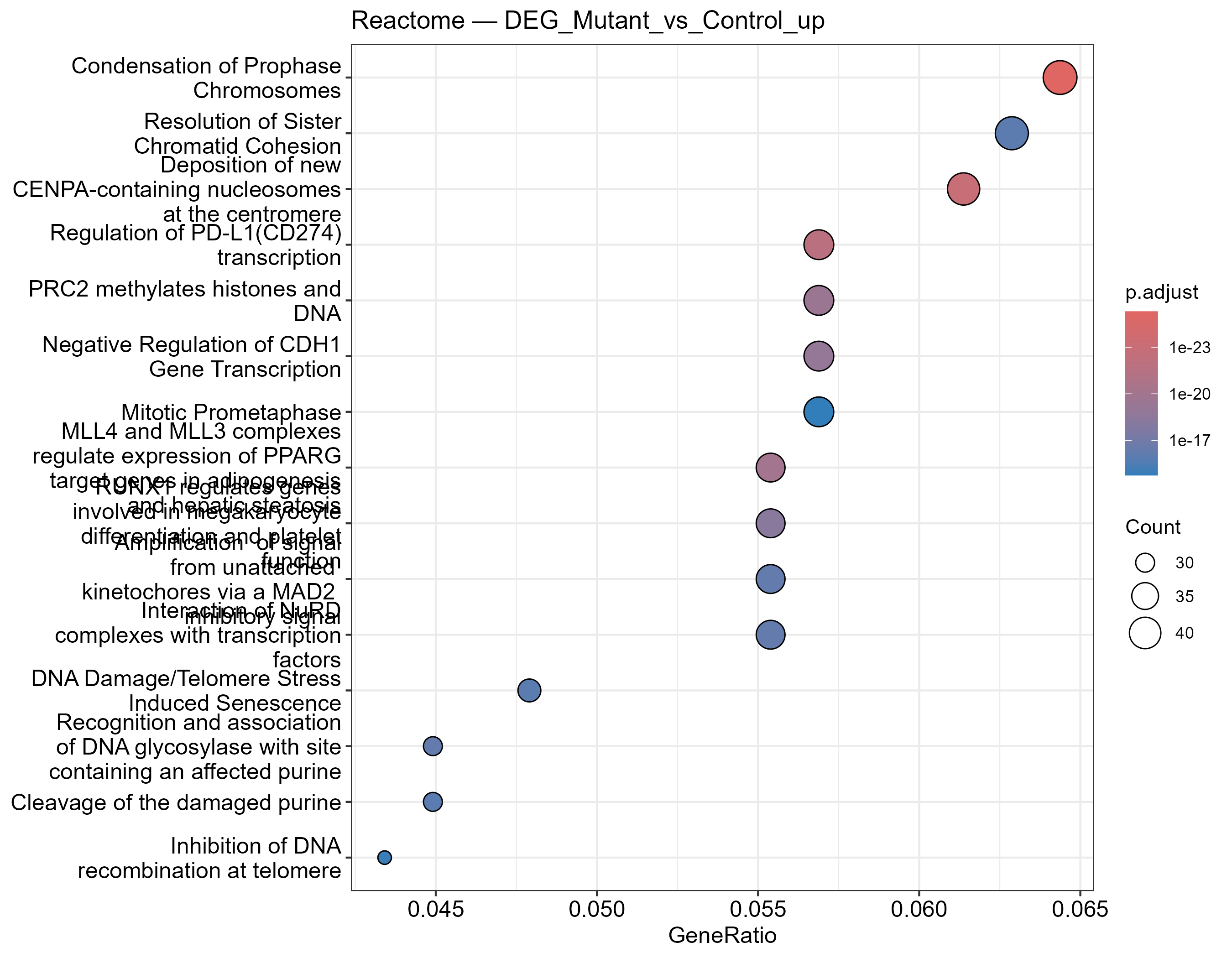
运行成功后,你应该看到三类点图(示例效果如下,你的网站实跑结果会替换成自己的截图):
GO Biological Process 富集点图——点大小为基因数,颜色为校正后 P 值:
KEGG 通路富集点图(离线缓存兜底,断网也能出图):
Reactome 通路富集点图:
Step 4|换成你自己的数据
此时就可以把 bulk-RNA-seq 流程跑出来的你自己的 output 文件夹交给它了(里面应有 DEG_*.csv)。输入 prompt:
My own differential-expression results are at: <paste the path to your bulk-RNA-seq output
folder here — it should contain DEG_*.csv files>.
Please first check whether the folder and the DEG tables have any format problems (required
columns: gene, log2fc — logFC / log2FoldChange are also accepted — and padj); if so, fix them
and tell me what you did. Once the data checks out, run the full enrichment pipeline
(GO BP/MF/CC, KEGG, and Reactome, with up- and down-regulated genes analyzed separately) and
show me the result dotplots.
Prefer the skill's own scripts in scripts/; if anything needs adapting, make the smallest
possible change — do NOT write large amounts of new code.
My organism is <mouse / human> — use the matching --organism setting. If you are not sure,
ask me before running.
等候 AI agent 运行结束,它会按"每个对比 × 上调/下调 × 每个通路库"各出一张表和一张点图。
Step 5|读懂 REPORT.md
让 AI 给你解析结果:
Please explain the REPORT.md in my enrichment results folder line by line:
1. What each output file is and what it contains (GO BP/MF/CC, KEGG, Reactome; up- vs
   down-regulated gene sets);
2. For my main comparison, which pathways are the most significantly enriched among the
   up-regulated genes, and which among the down-regulated genes;
3. Any warnings or things I should pay attention to (e.g., KEGG falling back to the local
   cache, or a direction with too few genes to enrich).
After explaining, tell me which figures and tables can be used directly in a paper or
presentation.
阅读完 AI 的解释,如果有不懂的直接问它。
更多分析
本技能只做基于阈值的富集分析(上调/下调分开)。下面两个技能与它是同一批下游,安装方式完全相同(一键 prompt 或网站下载 zip 包),都吃 bulk-RNA-seq 的 output:
指定基因表达柱状图 —— RNA-seq-gene-plot
一句话:把某个基因从归一化矩阵里单独拎出来画图。 某基因在各组表达多少(柱状图 + SD + 抖动散点 + 统计标注),或同组内两个基因谁高谁低(配对 t 检验),适合论文里挑关键基因出图。
详细介绍与下载:/zh/skills/RNA-seq-gene-plot
GSEA —— RNA-seq-GSEA
一句话:不设阈值,用全基因排序列表做富集。 对 MSigDB 格式的 GMT 基因集做 fgsea 富集,内置 Reactome 演示基因集开箱即用。注意 MSigDB 不含 KEGG 基因集——要做 KEGG 请用本技能(RNA-seq-enrichment)。
详细介绍与下载:/zh/skills/RNA-seq-GSEA