
零基础——用 AI Agent 做 GSEA 富集分析(RNA-seq-GSEA) | 全程复制粘贴
本教程以 workbuddy 作为 AI agent、Hy3 作为 AI API 为例。AI agent 本身的安装与配置请看AI Agent 安装教程。
在开始之前(必读):
- 如果你是第一次用 AI agent 做生信分析,强烈建议先跟一遍 bulk-RNA-seq 差异分析教程,熟悉"装技能 → 配环境 → 跑示例 → 换自己数据"的完整流程,再回来做本技能。
- 本技能是 bulk-RNA-seq 的下游技能:它吃的是 bulk-RNA-seq 流程产出的
DEG_*.csv差异分析结果表。请先跑完 bulk-RNA-seq 教程并保留好它的 output 文件夹。 - 一句话:不设阈值,用全基因排序列表做富集——对 MSigDB 格式的 GMT 基因集做 fgsea 富集,内置 Reactome 演示基因集开箱即用。
- 两个重要提醒:
- MSigDB 基因集文件(.gmt)因许可原因需要你自己到 MSigDB 官网注册下载,技能不代发;下载后拷进技能的
resources/gmt/文件夹即可(内置的 reactome_demo_mmu.gmt 可直接用,无需下载)。 - MSigDB 小鼠 C2 库不含 KEGG 基因集——要做 KEGG 请用 RNA-seq-enrichment 技能。
- MSigDB 基因集文件(.gmt)因许可原因需要你自己到 MSigDB 官网注册下载,技能不代发;下载后拷进技能的
教程结构:
- Step 1|安装 RNA-seq-GSEA 技能(只需一次)
- Step 2|配置运行环境(只需一次)
- Step 3|跑通示例数据
- Step 4|换成你自己的数据
- Step 5|读懂 REPORT.md
- 更多分析|下游技能简介(富集分析 / 指定基因柱状图)
Step 1|Install the RNA-seq-GSEA skill
输入以下 prompt:
Please install the "RNA-seq-GSEA" skill for me, into the D:\claw2bio folder:
1. Create a folder named claw2bio in the root of the D: drive (if it doesn't exist yet).
2. From the GitHub repository https://github.com/nihuanhe/claw2bio, fetch ONLY the folder
   bioinformatics/bulk_RNA_seq/RNA-seq-GSEA (use sparse checkout — do NOT clone the whole
   repository), and place it at D:\claw2bio\RNA-seq-GSEA.
3. If downloading from GitHub fails or is too slow, download the zip from this mirror link instead:
   https://claw2bio.site/downloads/RNA-seq-GSEA.zip
   and extract it to D:\claw2bio\RNA-seq-GSEA.
4. Read the SKILL.md inside, then confirm to me that the skill is ready and list the contents
   of the folder.
(If my PC has no D: drive, install to C:\claw2bio instead and tell me the actual path.)
Step 1 完成后,打开文件管理器确认 D:\claw2bio\RNA-seq-GSEA 文件夹存在,里面有 scripts/、examples/、resources/gmt/、SKILL.md 等内容。
Step 2|Set up the runtime environment
如果你已经按 bulk-RNA-seq 教程装好了 R(4.5 或以上),这一步主要是补装 fgsea 等 R 包。输入 prompt:
Please set up the runtime environment for the "RNA-seq-GSEA" skill at D:\claw2bio\RNA-seq-GSEA:
1. R should already be installed from the bulk-RNA-seq tutorial — verify that R is installed
   and report its version to me (it must be 4.5 or above). If R is missing, stop and tell me.
2. Install all R packages this skill needs (fgsea and its dependencies): try CRAN / Bioconductor
   online first; if any package fails or is too slow, stop and tell me about it.
3. When everything is installed, run the dependency-check script scripts/00_check_deps.R
   --organism mouse inside the skill folder and show me the result.
Step 2 结束后,AI agent 会告诉你依赖检查是否全部通过。
Step 3|跑通示例数据
输入 prompt:
The skill is installed at D:\claw2bio\RNA-seq-GSEA. Please run the bundled example:
1. Example input is at D:\claw2bio\RNA-seq-GSEA\examples\input\DEG_Mutant_vs_Control.csv
2. Use the built-in gene set resources/gmt/reactome_demo_mmu.gmt, with --organism mouse.
3. Write results to D:\claw2bio\RNA-seq-GSEA\examples\output\
4. Prefer the skill's own scripts in scripts/ — do NOT write new analysis code from scratch.
5. When the run succeeds, show me the key result figures: first the top-15 NES dotplot, then
   the enrichment running-score curve of the most significant gene set; then explain the
generated REPORT.md line by line.注意:在 Windows 上运行时如果看起来"卡住不动",大概率不是死机——fgsea 在部分 Windows 环境会被强制串行,耐心等即可。
运行成功后,你应该看到两类图(示例效果如下,你的网站实跑结果会替换成自己的截图):
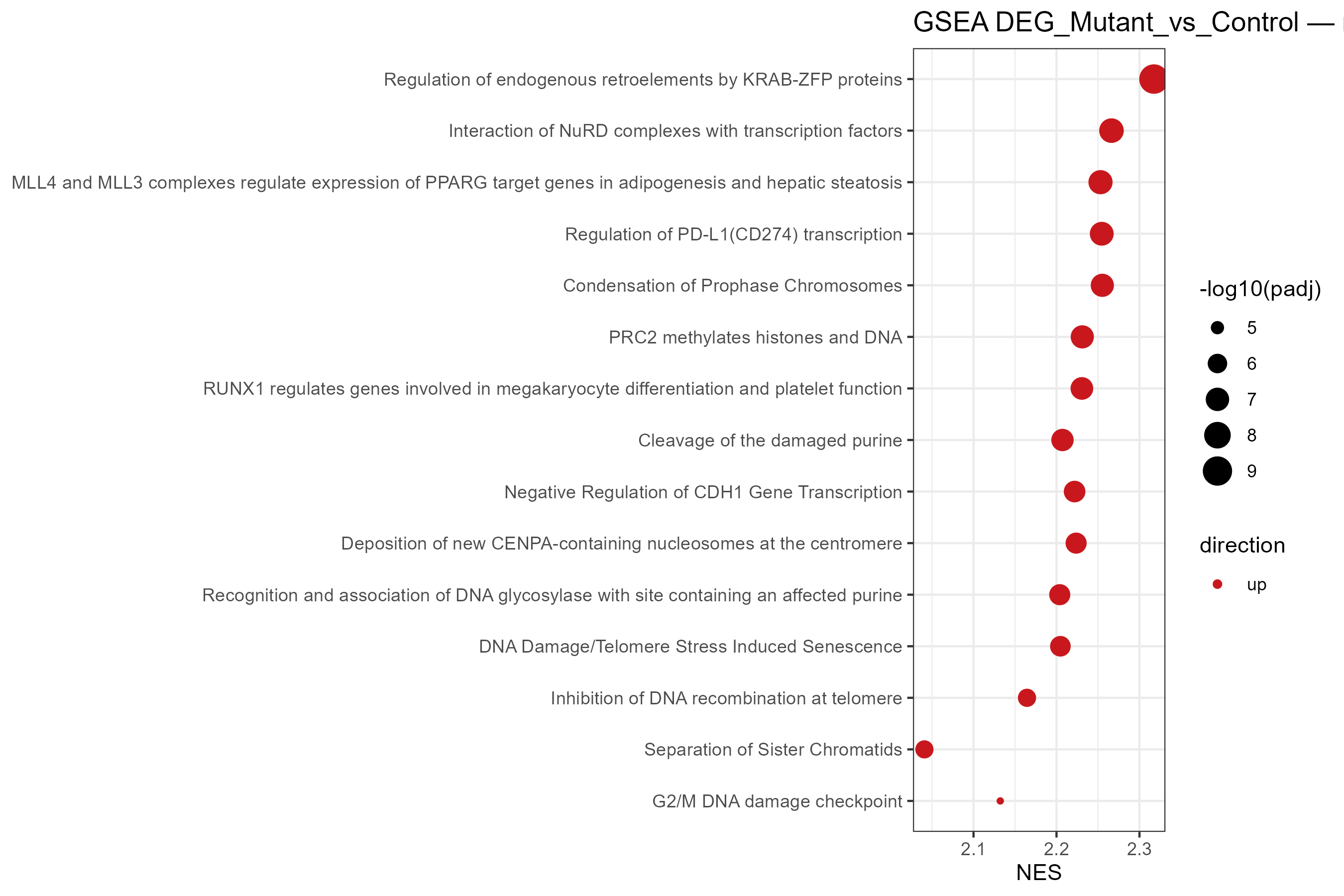
按 padj 取 top-15 基因集的 NES 点图(x 轴为 NES,上调红 / 下调蓝,点大小为 -log10(padj)):
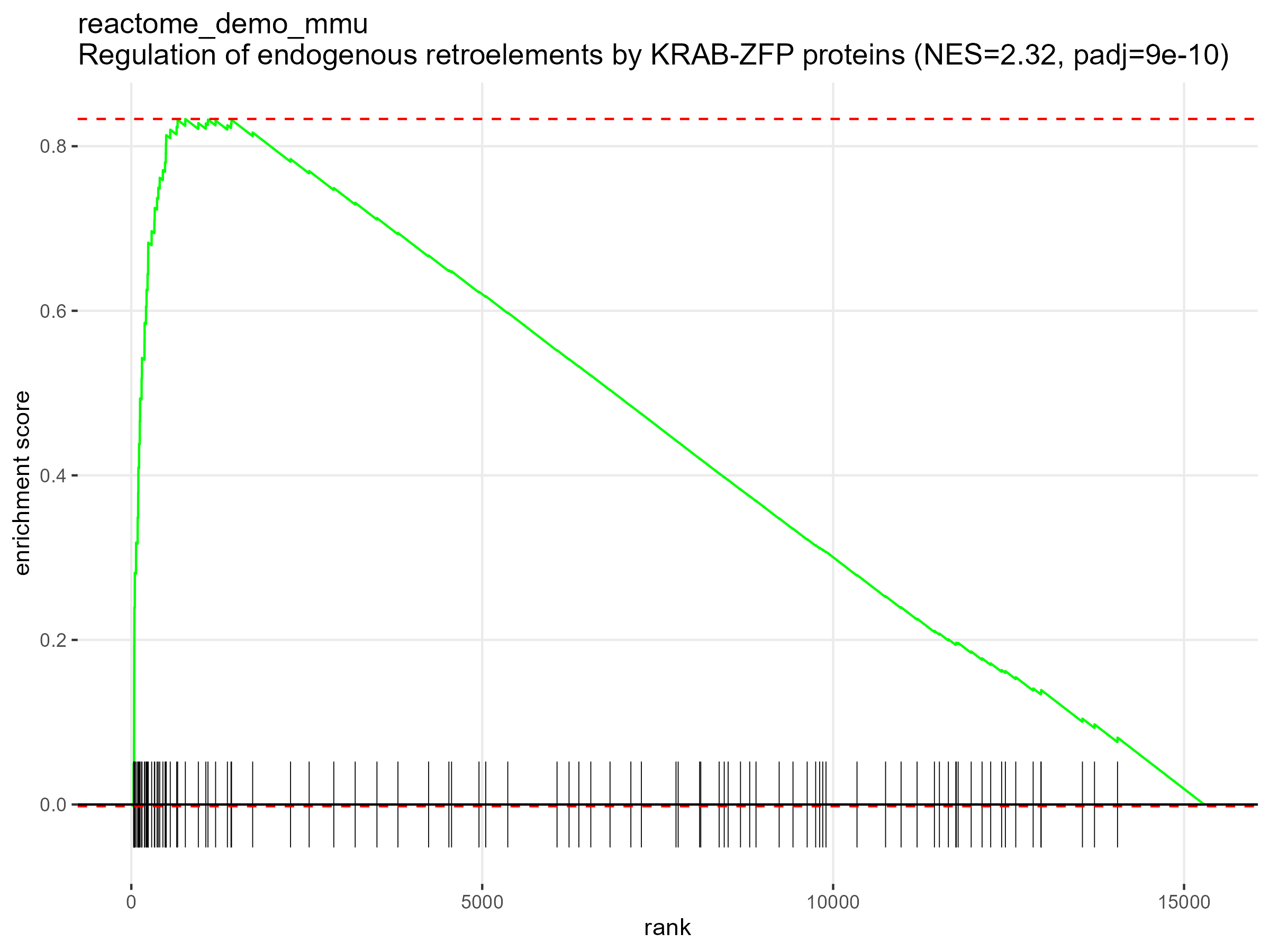
最显著基因集的经典 enrichment running-score 曲线:
Step 4|换成你自己的数据
把 bulk-RNA-seq 流程跑出来的你自己的 DEG_*.csv 交给它。如果你想用自己的 MSigDB 基因集,先告诉 AI 你把 .gmt 文件拷进了 resources/gmt/。输入 prompt:
My own differential-expression result is at: <paste the path to your DEG_*.csv file here>.
My organism is <mouse / human> — use the matching --organism setting.
1. First check whether my DEG table has any format problems (required columns: gene, log2fc,
   pvalue, padj); if so, fix them and tell me what you did.
2. <Choose ONE: Use the built-in reactome_demo_mmu.gmt gene set. / I have copied my own MSigDB
   .gmt files into D:\claw2bio\RNA-seq-GSEA\resources\gmt\ — use ALL .gmt files in that folder.>
3. Run the GSEA pipeline and write results to an output folder next to my data, then show me
   the NES dotplot and the top enrichment curve for each gene set.
4. Prefer the skill's own scripts in scripts/; if anything needs adapting, make the smallest
   possible change — do NOT write large amounts of new code.
5. Reminder: do NOT try to find KEGG gene sets in MSigDB — they are not there. If I ask for
   KEGG, tell me to use the RNA-seq-enrichment skill instead.
等候 AI agent 运行结束:每个 GMT 基因集出一张结果表(pathway、NES、pvalue、padj、leadingEdge)、一张 top-15 NES 点图和一张最显著基因集的富集曲线。
Step 5|读懂 REPORT.md
让 AI 给你解析结果:
Please explain the REPORT.md in my GSEA results folder line by line:
1. What each output file is and what it contains (the result CSV, the NES dotplot, the top
   enrichment curve);
2. Which gene sets are significantly enriched at padj < 0.05, split into up-regulated
   (positive NES) and down-regulated (negative NES);
3. Explain what NES and leadingEdge mean in plain language, and point out the top 3 most
   interesting gene sets for my comparison;
4. Any warnings or things I should pay attention to.
After explaining, tell me which figures and tables can be used directly in a paper or
presentation.
阅读完 AI 的解释,如果有不懂的直接问它。
更多分析
本技能只做 GSEA。下面两个技能与它是同一批下游,安装方式完全相同(一键 prompt 或网站下载 zip 包),都吃 bulk-RNA-seq 的 output:
富集分析(GO / KEGG / Reactome)—— RNA-seq-enrichment
一句话:DEG 表进,GO / KEGG / Reactome 富集表和点图出。 基于阈值的富集分析(上调/下调分开),是做 KEGG 富集的正确选择(MSigDB 没有 KEGG 基因集)。
详细介绍与下载:/zh/skills/RNA-seq-enrichment
指定基因表达柱状图 —— RNA-seq-gene-plot
一句话:把某个基因从归一化矩阵里单独拎出来画图。 适合把 GSEA 里 leading-edge 的关键基因挑出来,逐基因出发表级柱状图。
详细介绍与下载:/zh/skills/RNA-seq-gene-plot