
Zero-Basics — RNA-seq Enrichment Analysis (GO / KEGG / Reactome) with an AI Agent | Copy & Paste All the Way
This tutorial uses workbuddy as the AI agent and Hy3 as the AI API. For installing and configuring the AI agent itself, see the AI Agent setup tutorial.
Before you start (must read):
- If this is your first time doing bioinformatics with an AI agent, we strongly recommend following the bulk-RNA-seq differential analysis tutorial first, to learn the full "install skill → set up environment → run example → switch to your own data" workflow, then come back to this skill.
- This skill is a downstream skill of bulk-RNA-seq: it consumes the
DEG_*.csvdifferential-expression tables produced by the bulk-RNA-seq pipeline. Please finish the bulk-RNA-seq tutorial and keep its output folder before doing enrichment analysis. - In one sentence: DEG tables in, GO / KEGG / Reactome enrichment tables and dotplots out — GO and Reactome run fully offline; KEGG automatically falls back to a local GSON snapshot and then a legacy CSV cache when the network fails, so plots come out even without internet.
Tutorial structure:
- Step 1 | Install the RNA-seq-enrichment skill (one time only)
- Step 2 | Set up the runtime environment (one time only)
- Step 3 | Run the bundled example data
- Step 4 | Switch to your own data
- Step 5 | Read the REPORT.md
- More analysis | Related downstream skills (gene-expression barplot / GSEA)
Step 1 | Install the RNA-seq-enrichment skill
Paste this prompt:
Please install the "RNA-seq-enrichment" skill for me, into the D:\claw2bio folder:
1. Create a folder named claw2bio in the root of the D: drive (if it doesn't exist yet).
2. Download the current skill package:
   https://claw2bio.site/downloads/RNA-seq-enrichment.zip
   and extract it to D:\claw2bio\RNA-seq-enrichment.
3. If downloading from the website fails, fetch ONLY the folder
   bioinformatics/bulk_RNA_seq/RNA-seq-enrichment from
   https://github.com/nihuanhe/claw2bio (use sparse checkout — do NOT clone the whole
   repository), and place it at D:\claw2bio\RNA-seq-enrichment.
4. Read the SKILL.md inside, then confirm to me that the skill is ready and list the contents
   of the folder.
(If my PC has no D: drive, install to C:\claw2bio instead and tell me the actual path.)
When Step 1 finishes, open the file manager and confirm that D:\claw2bio\RNA-seq-enrichment exists, with scripts/, examples/, SKILL.md, etc. inside.
Step 2 | Set up the runtime environment
If you already installed R (4.5 or above) while following the bulk-RNA-seq tutorial, this step mainly adds the enrichment-specific R packages. Paste this prompt:
Please set up the runtime environment for the "RNA-seq-enrichment" skill at
D:\claw2bio\RNA-seq-enrichment:
1. R should already be installed from the bulk-RNA-seq tutorial — verify that R is installed
   and report its version to me (it must be 4.5 or above). If R is missing, stop and tell me.
2. Install all R packages this skill needs (clusterProfiler and its dependencies): try CRAN /
   Bioconductor online first; if any package fails or is too slow (especially large annotation
   packages such as org.Hs.eg.db and org.Mm.eg.db), stop and tell me — the bulk-RNA-seq skill's
   resources/ folder has precompiled packages and a mirror download address that both skills share.
3. Once the packages are in, run scripts/build_pathway_cache.R --organism both ONCE to build the
   local pathway cache. This creates dated KEGG GSON snapshots plus legacy CSV fallbacks;
   Reactome and GO are always offline.
4. Finally, run the dependency-check script scripts/00_check_deps.R --organism mouse inside the
   skill folder and show me the result.
When Step 2 finishes, the AI agent will tell you whether all dependency checks passed.
Local KEGG snapshots — generated by each user
The website and skill ZIP provide code only, not KEGG annotation files. Each user runs the cache-building script to download annotations from the official KEGG API on their own computer. There is no download from the cache owner's computer, so that computer does not need to stay online. KEGG API access is for academic users; non-academic use requires an appropriate license.
KEGG uses these sources:
- Default: online KEGG → newest valid local GSON → legacy CSV.
- Offline: add
--offlineto skip the online request and use local GSON → legacy CSV. - Exact snapshot: add
--kegg-gson "D:/path/kegg_mmu_gson_YYYYMMDD.rds"to force that file and skip the online request. Use thehsafile for human ormmufor mouse.
For example:
Rscript scripts/enrich.R examples/input examples/output --organism mouse --offline
Rscript scripts/enrich.R examples/input examples/output --organism mouse \
  --kegg-gson "D:/path/kegg_mmu_gson_20261116.rds"
Keep the snapshot date with your analysis records: a different KEGG snapshot can change enrichment results. A failed cache update does not replace the previous valid snapshot.
Step 3 | Run the bundled example data
Paste this prompt:
The skill is installed at D:\claw2bio\RNA-seq-enrichment. Please run the full enrichment
pipeline on the bundled example data:
1. Example input is at D:\claw2bio\RNA-seq-enrichment\examples\input\
2. Write results to D:\claw2bio\RNA-seq-enrichment\examples\output\
3. Prefer the skill's own scripts in scripts/ — do NOT write new analysis code from scratch.
4. When the run succeeds, show me the key result figures in this order: first the GO Biological
   Process dotplot, then the KEGG dotplot, and finally the Reactome dotplot; then explain the
   generated REPORT.md line by line.
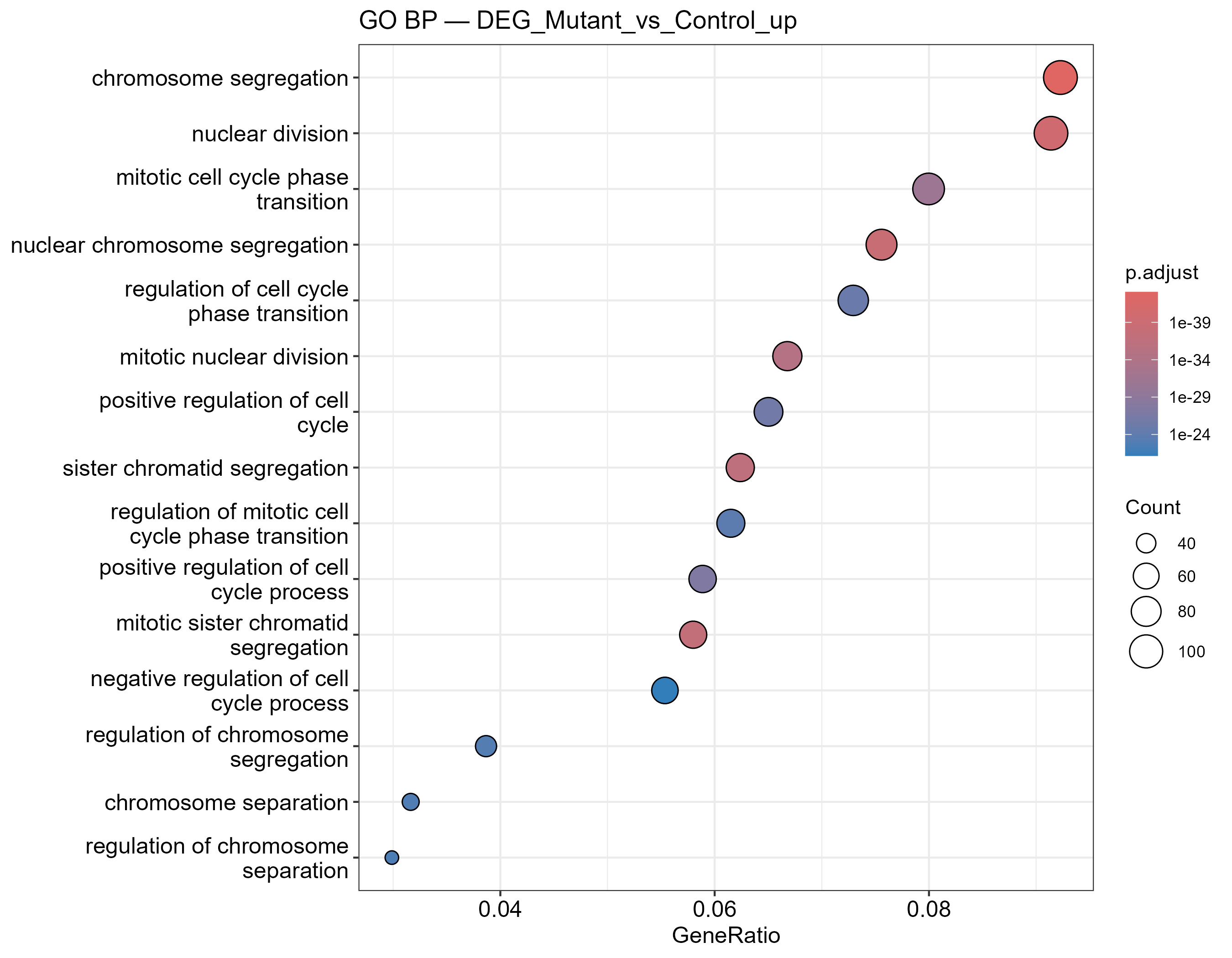
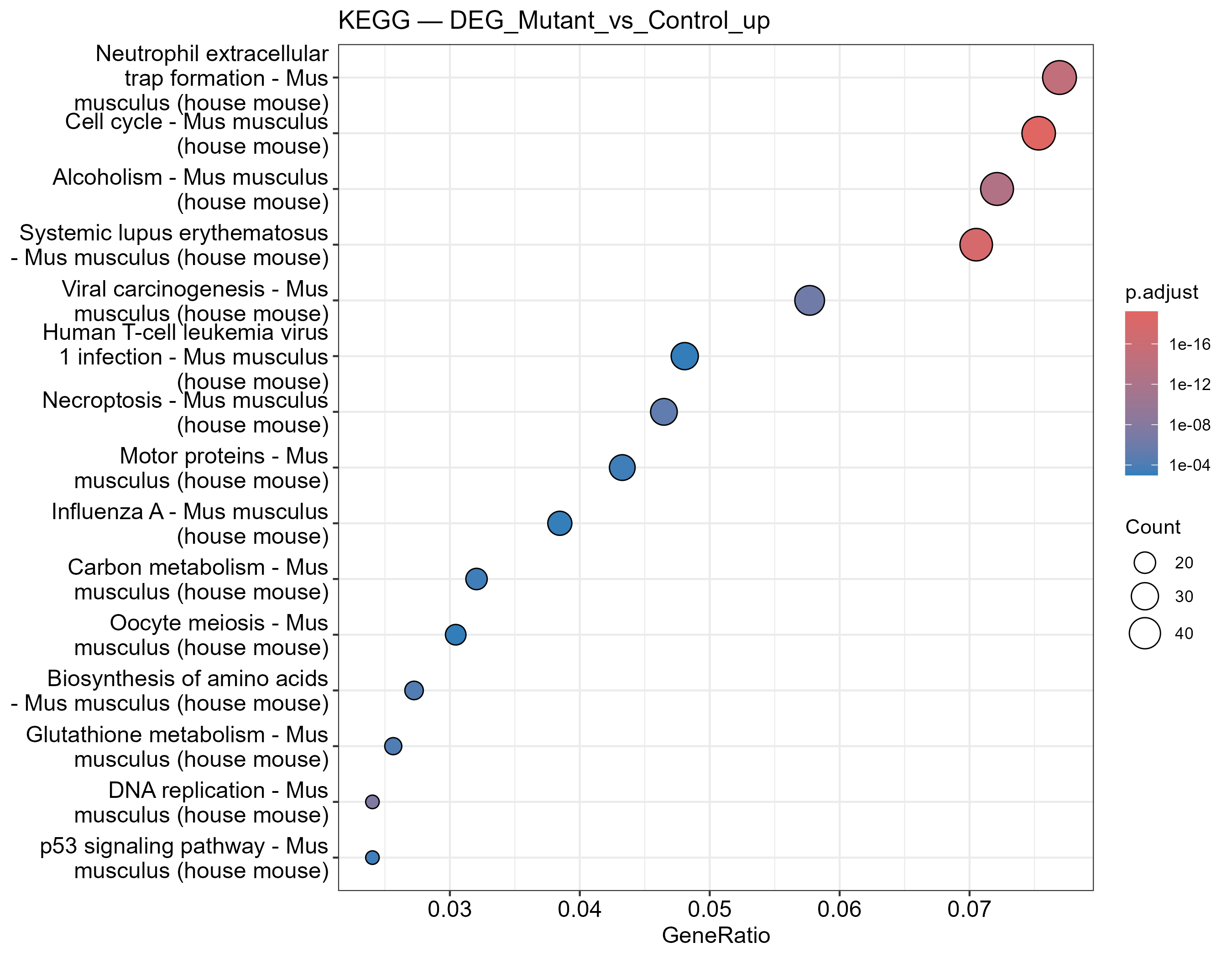
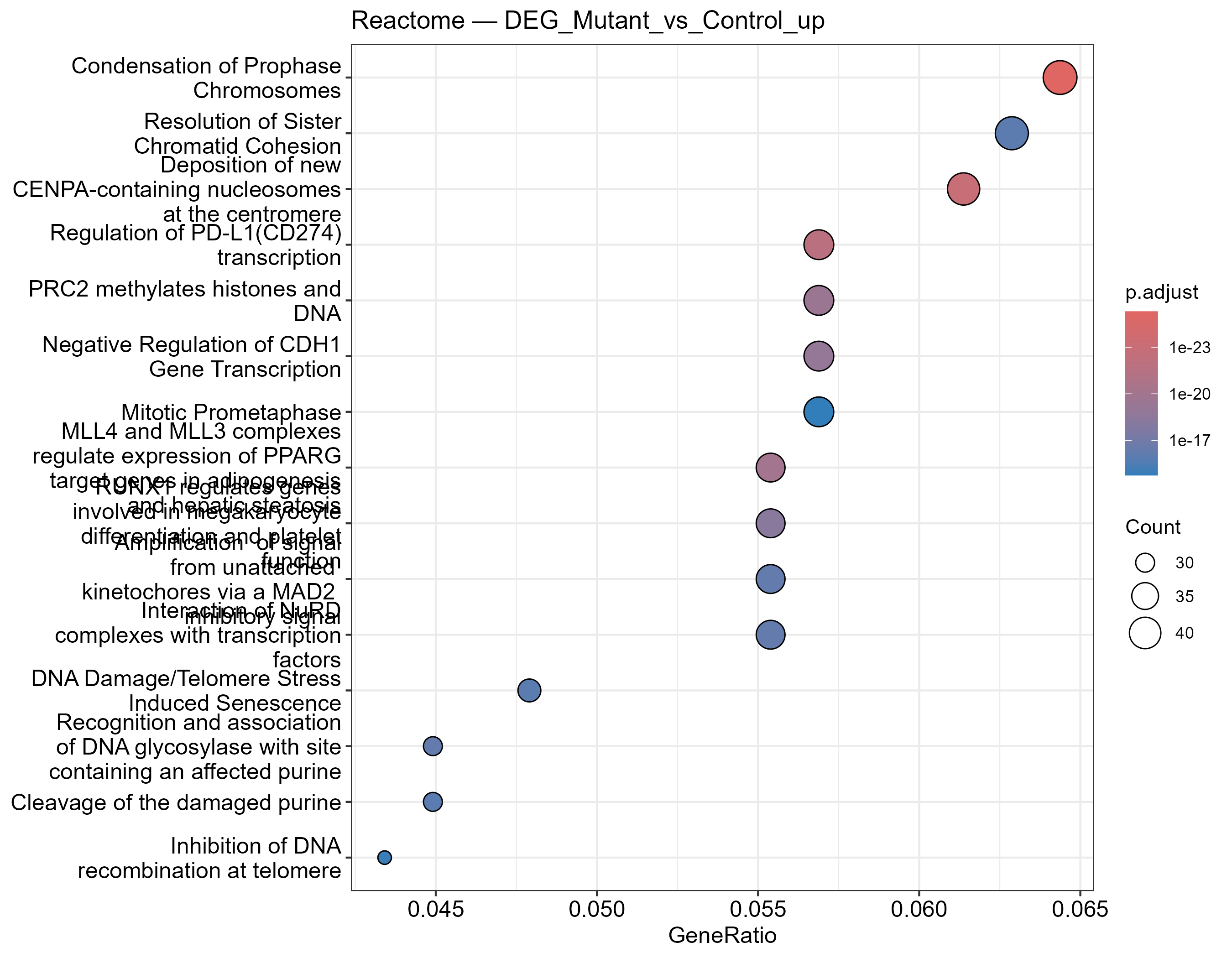
When the run succeeds, you should see three kinds of dotplots (examples shown below; replace with your own screenshots later):
GO Biological Process enrichment dotplot — dot size = gene count, color = adjusted P value:
KEGG pathway enrichment dotplot (local-cache fallback — works offline):
Reactome pathway enrichment dotplot:
Step 4 | Switch to your own data
Now hand over your own bulk-RNA-seq output folder (it should contain DEG_*.csv). Paste this prompt:
My own differential-expression results are at: <paste the path to your bulk-RNA-seq output
folder here — it should contain DEG_*.csv files>.
Please first check whether the folder and the DEG tables have any format problems (required
columns: gene, log2fc — logFC / log2FoldChange are also accepted — and padj); if so, fix them
and tell me what you did. Once the data checks out, run the full enrichment pipeline
(GO BP/MF/CC, KEGG, and Reactome, with up- and down-regulated genes analyzed separately) and
show me the result dotplots.
Prefer the skill's own scripts in scripts/; if anything needs adapting, make the smallest
possible change — do NOT write large amounts of new code.
My organism is <mouse / human> — use the matching --organism setting. If you are not sure,
ask me before running.
Wait for the AI agent to finish. It produces one table and one dotplot per "comparison × direction × pathway database".
Step 5 | Read the REPORT.md
Ask the AI to interpret your results:
Please explain the REPORT.md in my enrichment results folder line by line:
1. What each output file is and what it contains (GO BP/MF/CC, KEGG, Reactome; up- vs
   down-regulated gene sets);
2. For my main comparison, which pathways are the most significantly enriched among the
   up-regulated genes, and which among the down-regulated genes;
3. Any warnings or things I should pay attention to (e.g., KEGG falling back to the local
   cache, or a direction with too few genes to enrich).
After explaining, tell me which figures and tables can be used directly in a paper or
presentation.
After reading the AI's explanation, if anything is unclear, just ask it directly.
More analysis
This skill only does threshold-based enrichment (up/down separately). The two skills below are sibling downstream skills, installed in exactly the same way (one-click prompt or zip download from the website), and both consume the bulk-RNA-seq output:
Gene-expression barplot — RNA-seq-gene-plot
One sentence: pull a single gene out of the normalized matrix and plot it. How abundantly a gene is expressed across groups (barplot + SD + jittered points + statistics), or which of two genes is higher within the same group (paired t-test) — ideal for plotting key genes in a paper.
Details & download: /skills/RNA-seq-gene-plot
GSEA — RNA-seq-GSEA
One sentence: enrichment without thresholds, using the full ranked gene list. Runs fgsea against MSigDB-format GMT gene sets, with a built-in Reactome demo gene set that works out of the box. Note that MSigDB contains no KEGG gene sets — for KEGG, use this skill (RNA-seq-enrichment) instead.
Details & download: /skills/RNA-seq-GSEA