
Zero-Basics — Single-Cell Virtual Knockout with an AI Agent (scRNA-seq-virtual-ko) | Copy & Paste All the Way
This tutorial uses workbuddy as the AI agent and Hy3 as the AI API. For installing and configuring the AI agent itself, see the AI Agent setup tutorial.
Before you start (must read):
- If this is your first time doing bioinformatics with an AI agent, we strongly recommend following the bulk-RNA-seq differential analysis tutorial first, to learn the full "install skill → set up environment → run example → switch to your own data" workflow, then come back to this skill.
- ⚠️ Hardware requirement (applies to ALL single-cell skills): use a PC with ≥16 GB RAM and a multi-core CPU. The real example of this skill (10,859 cells) took ~2 hours on a 16 GB / 12-core machine — this is a long-running task.
- This skill is a downstream skill of the scRNA-seq standard pipeline: it consumes the
annotated_seurat.rdsproduced by that pipeline. Please finish the scRNA-seq standard pipeline first. - In one sentence: pick a gene; scTenifoldKnk (PMID: 35510185) builds a gene-regulatory network from the RNA counts layer, virtually knocks the gene out in silico, and outputs a differential-regulation table plus two figures.
- Three important reminders:
- The results are computational predictions of network perturbation — treat them as candidate mechanistic hypotheses that require experimental validation; do not claim them as conclusions in a paper.
- This skill CANNOT resume an interrupted run (unlike the standard pipeline and pseudotime): scTenifoldKnk is one uninterruptible call — if it crashes or the machine sleeps, all computation is lost. Make sure your PC will not go to sleep before a long run.
- Do NOT set --nc-nnet above 5: the package default of 10 crashes inside manifoldAlignment due to numerical degeneracy ("incorrect number of dimensions"), wasting the whole network-construction run.
Tutorial structure:
- Step 1 | Install the scRNA-seq-virtual-ko skill (one time only)
- Step 2 | Set up the runtime environment (one time only)
- Step 3 | Run the bundled example data
- Step 4 | Switch to your own data
- Step 5 | Read the REPORT.md
- More analysis | Related skills (standard pipeline / pseudotime)
Step 1 | Install the scRNA-seq-virtual-ko skill
Paste this prompt:
Please install the "scRNA-seq-virtual-ko" skill for me, into the D:\claw2bio folder:
1. Create a folder named claw2bio in the root of the D: drive (if it doesn't exist yet).
2. From the GitHub repository https://github.com/nihuanhe/claw2bio, fetch ONLY the folder
   bioinformatics/sc_RNA_seq/scRNA-seq-virtual-ko (use sparse checkout — do NOT clone the
   whole repository), and place it at D:\claw2bio\scRNA-seq-virtual-ko.
3. If downloading from GitHub fails or is too slow, download the zip from this mirror link instead:
   https://claw2bio.site/downloads/scRNA-seq-virtual-ko.zip
   and extract it to D:\claw2bio\scRNA-seq-virtual-ko.
4. Read the SKILL.md inside, then confirm to me that the skill is ready and list the contents
   of the folder.
(If my PC has no D: drive, install to C:\claw2bio instead and tell me the actual path.)
When Step 1 finishes, open the file manager and confirm that D:\claw2bio\scRNA-seq-virtual-ko exists, with scripts/, examples/, SKILL.md, etc. inside.
Step 2 | Set up the runtime environment
If you already installed R (≥4.5) + the Seurat environment while following the scRNA-seq tutorial, this step mainly adds scTenifoldKnk. Paste this prompt:
Please set up the runtime environment for the "scRNA-seq-virtual-ko" skill at
D:\claw2bio\scRNA-seq-virtual-ko:
1. R should already be installed from the scRNA-seq tutorial — verify that R (4.5 or above)
   and the Seurat environment are installed; report versions to me. If anything is missing,
   stop and tell me.
2. Install the additional R packages this skill needs (scTenifoldKnk and its dependencies):
   try CRAN / Bioconductor online first; if any package fails or is too slow, stop and tell
   me about it. Also make sure Python has pandas / numpy / scipy available.
3. When everything is installed, confirm to me that the skill can run, and remind me of my
   RAM size and CPU core count (single-cell work needs ≥16 GB RAM and a multi-core CPU).
4. IMPORTANT: remind me that this skill CANNOT resume an interrupted run — before the real
   run I must make sure this PC will NOT go to sleep (power settings), or all computation
   is lost.
Step 3 | Run the bundled example data
Paste this prompt:
The skill is installed at D:\claw2bio\scRNA-seq-virtual-ko. Please run the bundled example:
1. Find the example annotated_seurat.rds in the skill's examples/ folder.
2. Run the smoke-test example with the skill's own scripts (it should take only a few minutes):
   python scripts/run_virtual_ko.py <annotated_seurat.rds> <output_dir> --gene <the example's
   target gene>
3. Prefer the skill's own scripts in scripts/ — do NOT write new analysis code from scratch.
4. When the run succeeds, show me the top-20 differential-regulation barplot and the Z-score
   scatter plot; then explain the REPORT.md line by line.
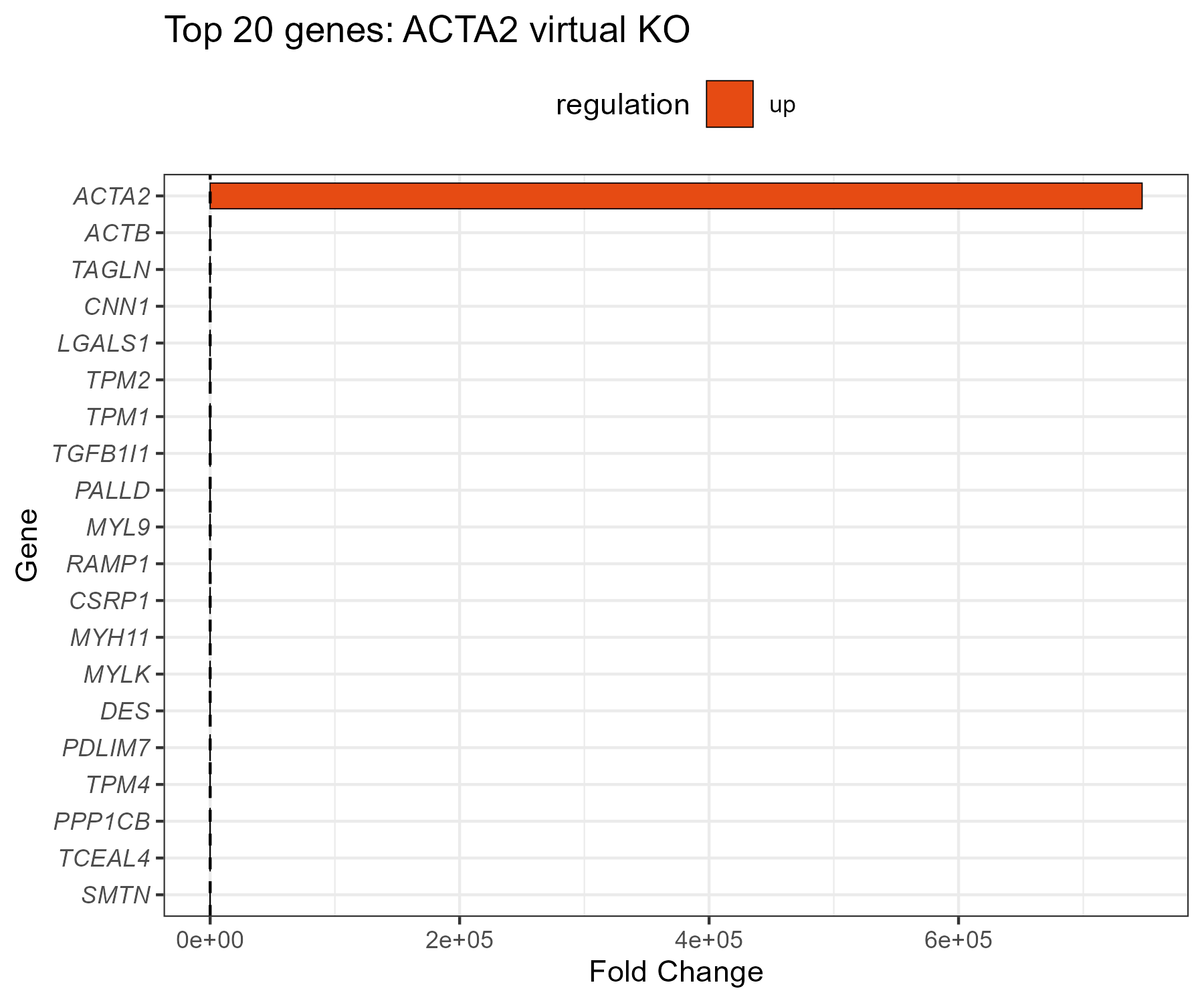
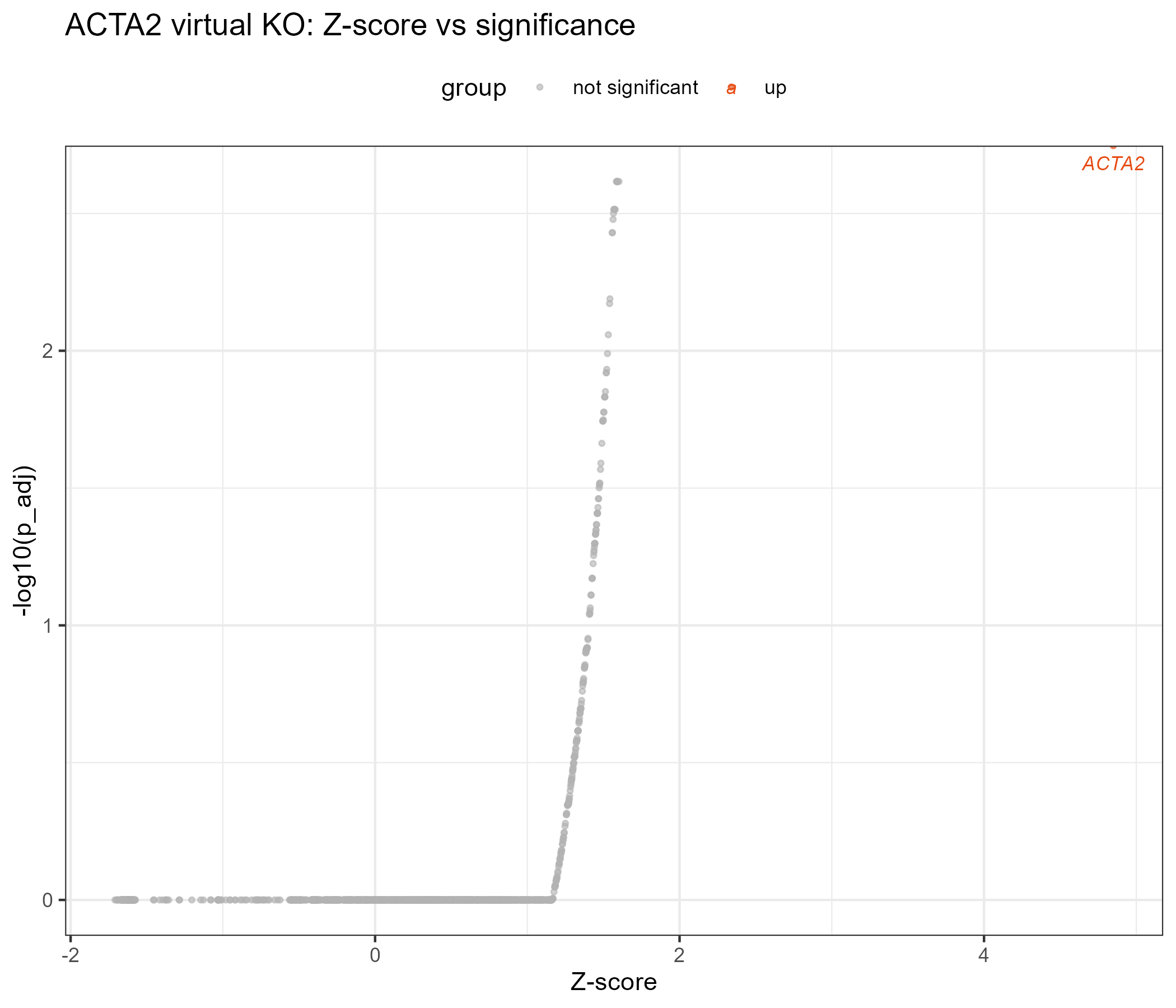
When the run succeeds, you should see two figures (examples below; replace with your own screenshots later). Anchor from the real example: knocking out ACTA2 in full GSE234527 (10,859 cells; 2000 highly-variable genes × 5 subsampled networks × 500 cells per network, ~2 hours) yielded 54 significantly differentially regulated genes (p_adj < 0.05), with top hits MYLK / TPM1 / TPM2 / TAGLN / CNN1 / DES — smooth-muscle program genes:
Top-20 differentially regulated genes by |FC| after ACTA2 knockout:
Z-score vs -log10(p_adj) scatter plot, with significant genes automatically labeled:
Step 4 | Switch to your own data
Hand over your own annotated_seurat.rds from the standard pipeline, and name the gene to knock out. Gene names are case-sensitive — use the species-correct spelling (TP53 for human, Trp53 for mouse). Paste this prompt:
My own annotated Seurat object is at: <paste the path to your annotated_seurat.rds here —
it must come from the scRNA-seq standard pipeline and contain the RNA counts layer and
cell_type_final>.
Please virtually knock out this gene: <write your gene here — case-sensitive, species-correct
spelling: TP53 for human, Trp53 for mouse>.
<Optional: only build the network within these cell types: <labels> — use --subset-labels.
This makes the result more targeted.>
1. First verify my rds loads correctly and my target gene exists in the data. If the gene is
   expressed in fewer than 5% of cells, warn me (the result will be unreliable) and ask
   whether to continue.
2. Run the virtual knockout with the skill's own scripts in scripts/ — do NOT write new
   analysis code from scratch. Use --nc-nnet 5 (do NOT use the package default of 10 — it
   crashes inside manifoldAlignment with "incorrect number of dimensions" and wastes the
   whole run).
3. Before starting the long run, WARN me about the expected runtime (it scales with cells ×
   genes × nc_nnet; the 10,859-cell real example took ~2 hours on a 16 GB / 12-core machine),
   remind me this skill CANNOT resume, and confirm that my PC will not go to sleep.
4. When the run succeeds, show me the top-20 barplot and the Z-score scatter plot, and
   explain the REPORT.md line by line.
Wait for the AI agent to finish: <GENE>_diffRegulation.csv (full result table: Gene, distance, Z, FC, p_value, p_adj) + the top-20 barplot + the Z-score scatter plot + a summary JSON.
Step 5 | Read the REPORT.md
Paste this prompt:
Please explain the REPORT.md in my virtual-knockout results folder line by line:
1. What each output file is and what it contains (the diffRegulation CSV, the top-20 barplot,
   the Z-score scatter plot, the summary JSON);
2. Walk me through MY results: how many genes are significantly differentially regulated
   (p_adj < 0.05), what are the top hits, and what biological programs do they suggest;
3. Remind me explicitly: these are COMPUTATIONAL PREDICTIONS from network perturbation —
   they are candidate mechanistic hypotheses and MUST be validated experimentally before
   being claimed in a paper;
4. Any warnings or things I should pay attention to.
After explaining, tell me how to best present these results (e.g., as hypothesis-generating
figures in a presentation).
After reading the AI's explanation, if anything is unclear, just ask it directly.
More analysis
The two skills below are companions of this one, installed in exactly the same way (one-click prompt or zip download). Both also require ≥16 GB RAM + a multi-core CPU:
scRNA-seq standard pipeline — scRNA-seq
One sentence: raw matrices in (any format), an annotated Seurat object out. If you don't have an annotated_seurat.rds yet, do this first.
Details & download: /skills/scRNA-seq
scRNA-seq pseudotime — scRNA-seq-pseudotime
One sentence: from the annotated Seurat object, learn a trajectory with monocle3, order cells by pseudotime, and find pseudotime-associated genes. The key genes found in pseudotime are perfect targets for a virtual knockout.
Details & download: /skills/scRNA-seq-pseudotime